Use response records, progress, missed questions, and private chat to support the panel during the study.
Updated October 14, 2026
Screenshots illustrate the controls below. Layouts and labels may vary with your survey configuration. Select an image or “View full size” to open it in a new tab.
Check whether Round 2 records are new or copied
Set the round selector to the round you are investigating.
Check whether that round was created with answers or with no answers.
If answers were copied, expect original timestamps and carried-forward completion. Do not interpret those as new visits.
If the round started empty, check that the participant saved the relevant pages. A displayed Round 1 answer is not yet a saved Round 2 response.
For any cleanup, verify the selected round, users, and page scope before deleting response records.
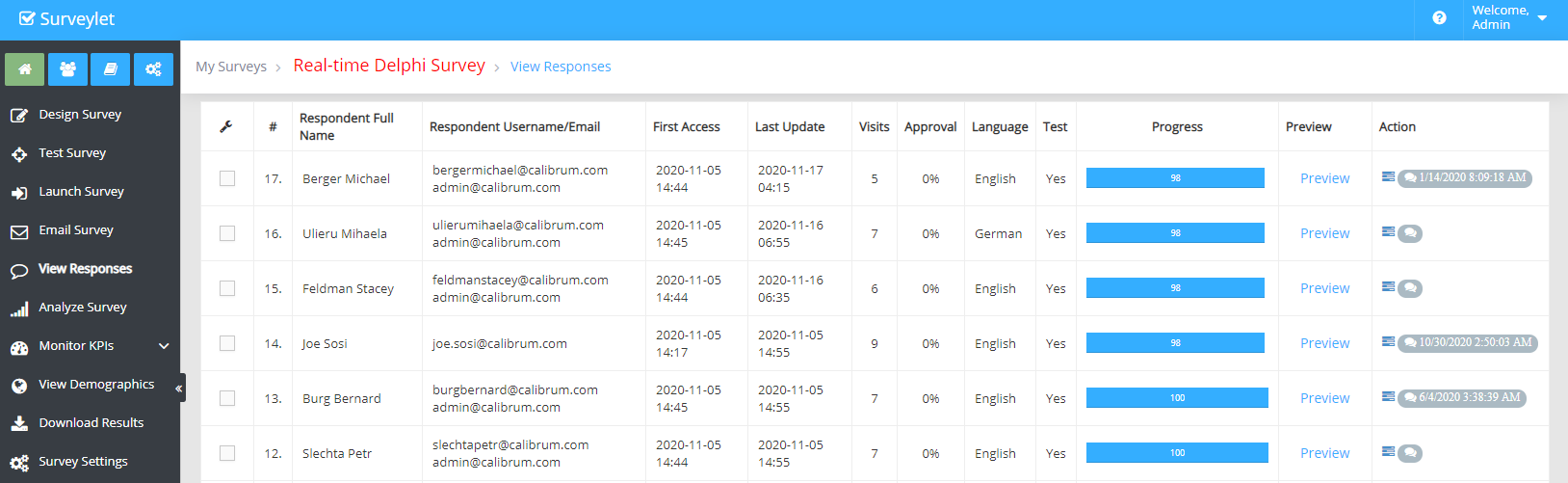
Open View Responses to review entered questionnaires and, where applicable, non-respondents. Depending on privacy settings, records show identity, visits, language, progress, test status, and activity timestamps.
Field or action
Use it for
Visits
Checking entries through the invitation link; it is not a count of unique participants.
Progress
The share of configured progress inputs that have answers.
Progress depends on Include in Progress settings. Optional questions, hidden inputs, branching, and adaptive additions can make a percentage differ from the study team’s definition of completion.
Copied answers in a new round can make a questionnaire appear complete without a new visit. Define and document how you identify active participation in each round.
Use Chat to clarify a technical issue or point the person to the participant guide. Check their saved data with Preview if necessary. Preserve the participant’s independence when answering substantive study questions.
Deleting selected questionnaires removes data but does not necessarily remove the person’s group membership. They may be able to return. Removing them from a group can affect other surveys using that group. Export and check the action’s scope before proceeding.
Detailed instructions: View Responses
To monitor your participants' survey progress, the View Responses page can provide you the information you need. It lists the list of responses starting with the most recent one with questionnaire owner details such as names, email address, number of visits, progress and so on. If Survey Privacy level is set to High, any user-identifying information (such as name, email) is not displayed.
Respondent Full Name
Name of the panelist the response belongs to. Responses are also called Questionnaires.
Respondent Username/Email
Username and Email of questionnaire author. If email is the same as the username, then only the one is displayed.
First Access
The first time panelist entered the survey.
Last Update
The last time panelist entered the survey.
Visits
The number of visits panelists has had so far. A visit is a new click on the survey invitation link. Each time the user clicks on the survey invitation link, a new session is initiated and the "visits" counter is increased.
Approval
Indicates how many people viewed and approved (by not changing their existing answers) the latest change made by someone in the team. the higher the better. 100 means that everyone looked at the last change for the question and didn't change their existing answers, so they are all in confirmation of the group's decision.
Language
The language the panelists is using.
Test
Shows if this response is a test response or not. If it's a test response, then it was submitted from by the administrator through the Test Survey page.
Progress
Progress is a percentage value that is calculated from the number of questions (standard questions and matrix cells) versus all the questions and matrix columns whose "Include in Progress" property was set to Yes.
Preview
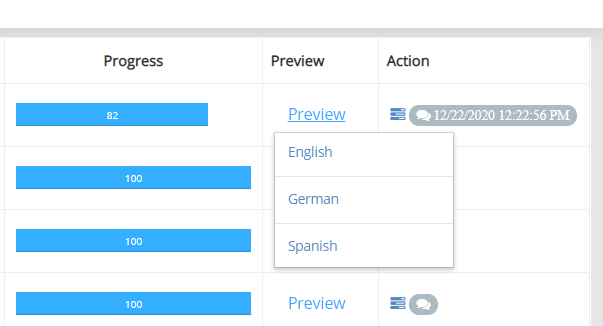
You can preview each panelist's answers for the entire survey by clicking on the Preview link button. If the survey is multi-lingual survey, then a dropdown displaying all survey design languages will be prompted.
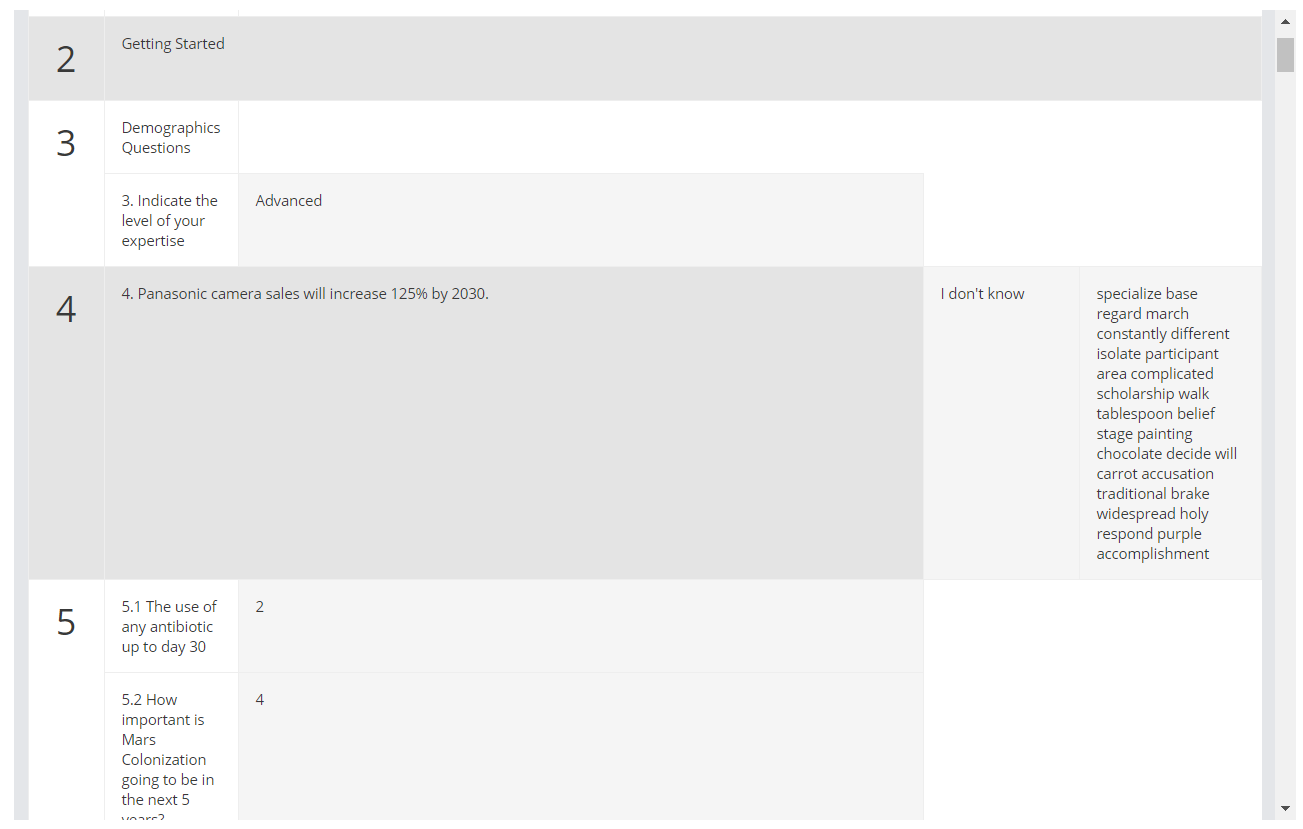
In the popup window, all survey questions are displayed with any answers the panelist provided:
Action
Allows administrative functions such as:
- Missed Questions: review list of questions that have not been filled out by the panelists.
- Chat: talk to respondents through a two-way one-on-one communication window. Email variables can be used in chat messages.
You can find group-level survey progress information also such as how many people responded, how many people has made no progress in the survey and so on.
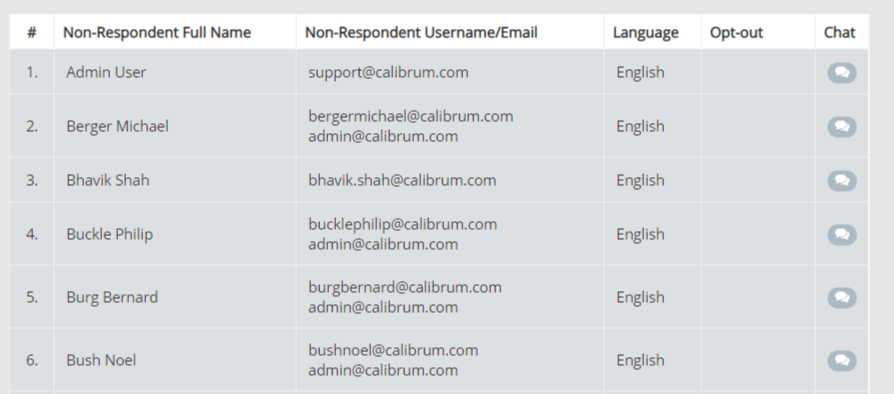
In the Non-Respondents table below, you may find the panelists who are members of the survey participants group but have not yet entered the survey. If there is no records in this table, this block is not displayed.
Respondent Full Name
Name of the panelist.
Respondent Username/Email
Username and Email of panelist. If email is the same as the username, then only the one is displayed.
Language
The language the panelists is using.
Opt-out
If panelist had requested to be removed from the survey (via sending us a remove me email), he is added to the "Opt-out List" and this field will be set to Yes. You cannot email these panelists any longer. To reinstate the opt-out status, your panelists will need to email from the flagged email address to us stating that s/he requests to be reinstated. Survey administrators cannot reinstate opt-out users.
Chat
Talk to your respondents through a two-way one-on-one communication window. Email variables can be used in chat messages.