Select the level of randomization your design needs while preserving ordered scales and essential study instructions.
Updated October 12, 2026
Screenshots illustrate the controls below. Layouts and labels may vary with your survey configuration. Select an image or “View full size” to open it in a new tab.
Standard randomization options
Level
How it works
What to check
Questions
Randomizes marked questions within their page.
Questions remain on the same page.
Choices
Supports flipping order or scrambling selected choices.
Preserve the meaning of ordered rating scales.
Matrix rows
Randomizes rows, with row-title separators used for blocks.
Keep help text and row labels attached to the correct item.
Pages
Uses a branching instruction for a specified page range.
Keep consent and closing instructions outside the randomized block.
Scrambling scale choices is unsuitable when their stored order defines the Likert score or range allocation. The documented Flip Order option reverses the presentation while preserving the relative scale structure. Test the actual saved values.
Randomize a block of pages
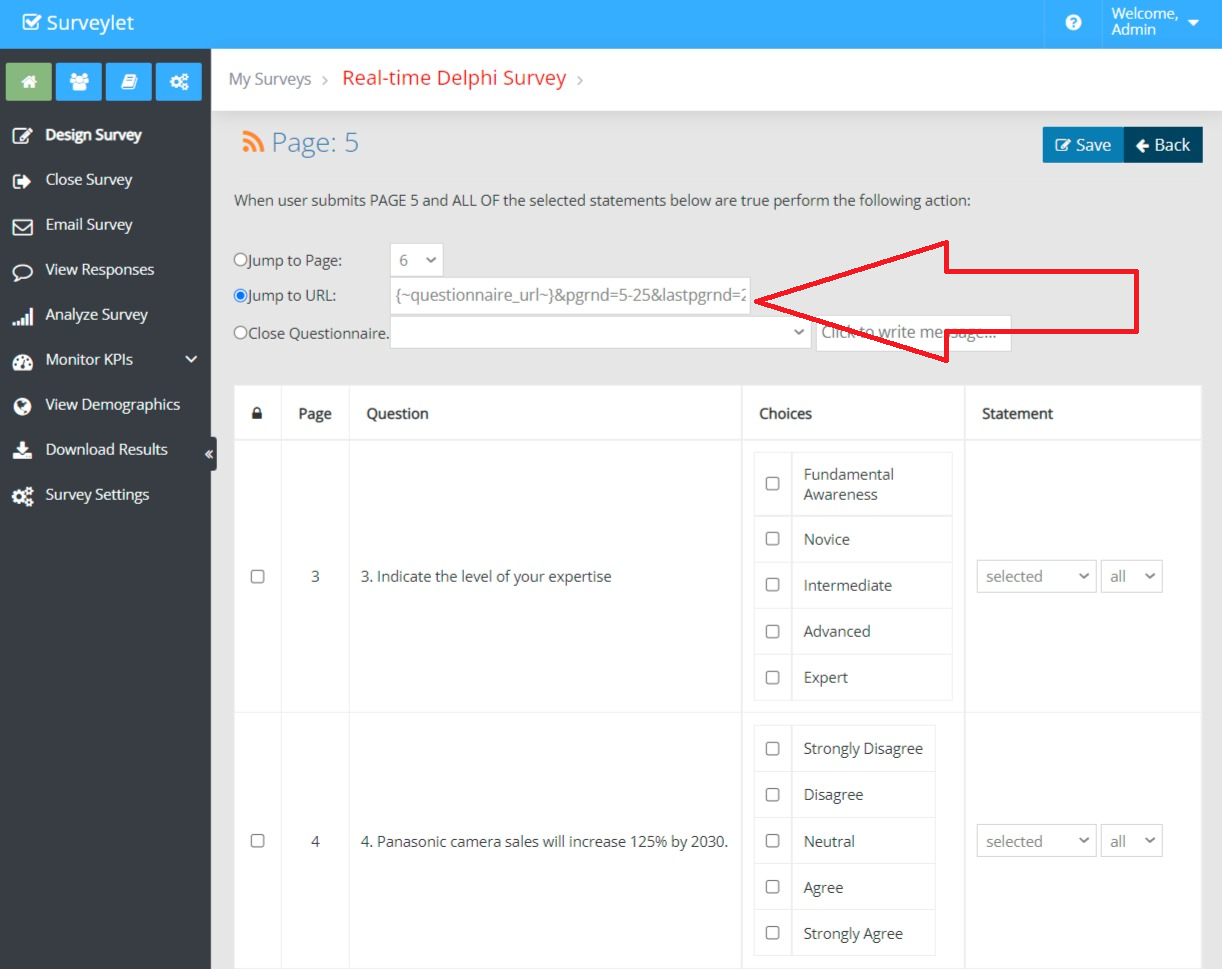
The documented page-branching Jump to URL pattern for pages 5–25, followed by page 26, is:
{~questionnaire_url~}&pgrnd=5-25&lastpgrnd=26
Apply the instruction to each page in the randomized block. Participants are sent to unvisited pages in that range until the block is complete, then to the final page. The page selector and Save button may be hidden during randomized navigation. The documented option to keep Save available is:
Surveylet documents branching-based weighted allocation to other surveys and stratified block allocation to two treatment arms. These are advanced configurations, separate from shuffling questions.
Confirm the target surveys, participant identifiers, allocation settings, and export requirements with Calibrum before implementation. Test the allocation records and all routes against your protocol; do not copy a worked example containing another account’s survey URLs.
Detailed instructions: Randomization
There are some undocumented advanced Surveylet features related to (page, question, choice, matrix row, intra- or inter- survey navigation) randomization including the Randomized Stratified Permutations used to randomly allocate panelists to one of two treatment arms in Medical trials.
Here is the list:
1) Randomize Pages
Page range randomization: Surveylet allows you to designate block of pages (page range) where each participant will be taken through randomly (not sequentially). Using the "JUMP TO URL" example below, we add page branching logic to instruct Surveylet to apply page navigation sequence randomization between page 5 and page 25. When they click on the NEXT (>>) button they are randomly taken a page between pages 5-25 that have not yet visited until they have visited all pages. If they then visited all pages between page 5 and page 25, then they are taken to the final landing page, i.e. last page (lastpgrnd). We must add the same page branching logic for all pages starting from page 5 through page 25 exactly as shown below. Page 26 will not need the randomization logic as it is the final landing page. You may set up multiple page rage randomization in your survey, where each page range can be randomized individually using the syntax provided in the example below:
Jump to URL: {~questionnaire_url~}&pgrnd=5-25&lastpgrnd=26
During page randomization, the Page Selector dropdown and SAVE PAGE button are hidden until randomization is turned off for panelist (which happens after all randomized pages have been visited by panelist). To enable the display of the SAVE button to save answers on the page during page randomization, you need to append the "forcesavebtndisplay=1" parameter to the above condition. E.g.:
When you mark a question as Randomized from Question Properties window, the question will be added to the list of questions randomized on the page. Randomization will happen per page, not across pages, so questions will always stay on same page.
3) Randomize Choices
From Question Settings, randomize choices using 1) scramble order, 2) flip order.
4) Randomize Matrix Rows
From Question Settings, randomize matrix rows using 1) scramble order, 2) flip order. You can randomize rows within a block in a matrix. You separate blocks by marking a row as "Row Title". This would allow you to place all matrix rows in a single matrix on a page instead of creating multiple matrices.
5) Randomize to Other Surveys
You use Page Branching logic here. You can assign the same randomization logic to multiple choices and Surveylet will do a weighted randomization as to which choice's logic will be picked. You can weight some choice more than others:
You use Page Branching logic here also which was developed for medical Delphi's and is popular in clinical trials. It's designed to randomly take users for an A/B treatment arm.
When a new user submits the page, s/he will be added as the new user in the appropriate block if there is still an empty unused entry available. If none available, then a new block (of random size of 4,6,8) is generated (with a new blocksequencenumber) and written into the allocation log unused (randomly allocated 50:50 to each of the two treatment arms). The size of the block (and next block and so on) is randomly chosen from the available block sizes. The system chooses a block size (and sequence therein) from all available options which does mean that larger block sizes (e.g., 8) have a greater chance of being selected compared to smaller block sizes (e.g., 4)