Screenshots illustrate the controls below. Layouts and labels may vary with your survey configuration. Select an image or “View full size” to open it in a new tab.
Detailed instructions: External Metrics Tab
A performance indicator or key performance indicator is a type of performance measurement. KPIs evaluate the success of an organization or of a particular activity in which it engages. Often success is simply the repeated, periodic achievement of some levels of operational goal, and sometimes success is defined in terms of making progress toward strategic goals.
Often success is simply the repeated, periodic achievement of some levels of operational goal (e.g. zero defects, 10/10 customer satisfaction), and sometimes success is defined in terms of making progress toward strategic goals. Accordingly, choosing the right KPIs relies upon a good understanding of what is important to the organization. What is deemed important often depends on the department measuring the performance – e.g. the KPIs useful to finance will differ from the KPIs assigned to sales.
While you can add and configure internal KPI's to be used in your survey questions, often times it is necessary to compare those internal KPI's to external KPI's (such as business metrics, or metrics related to your employees such as sick days, or stock performance, weather data, and son on). External metrics are used in Surveylet's Advanced Analytics component, which requires the Advanced Analytics optional add-on service added to your account. External KPI's are a list of measures you want to include Surveylet's trend analysis, comparative analysis, predictive and prescriptive analytics.
External KPI's
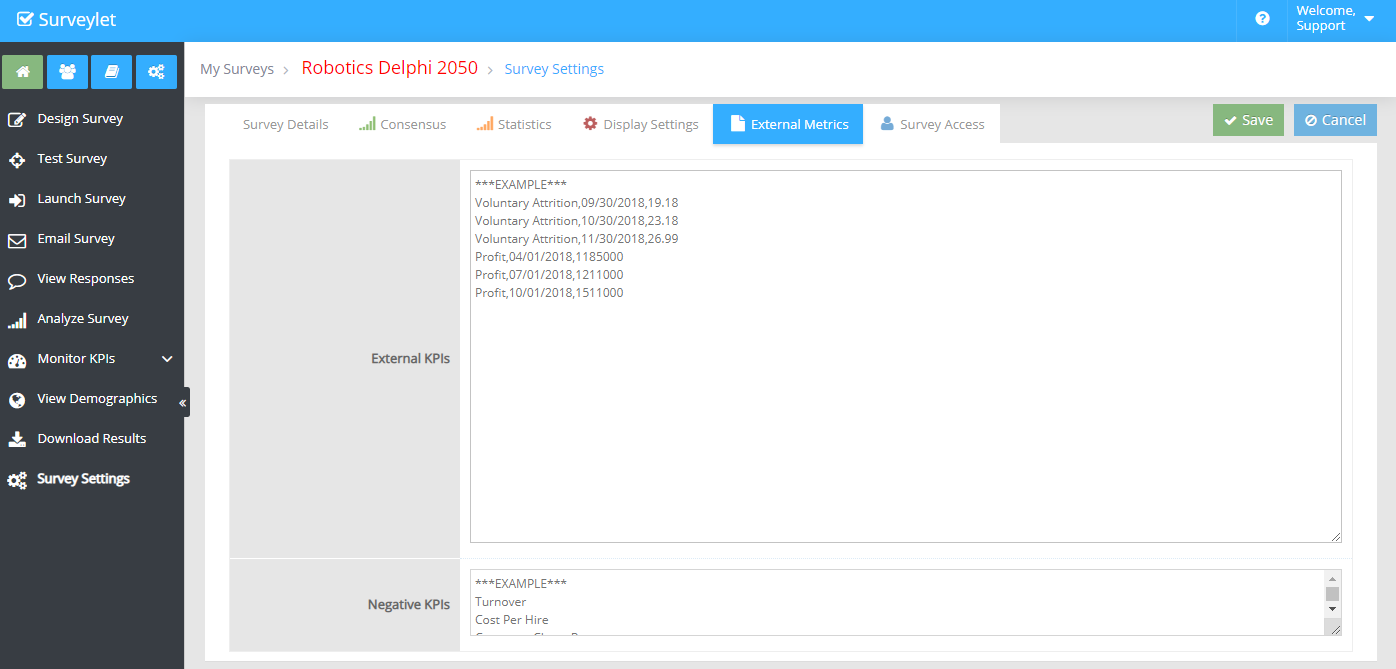
List of external KPI's to import. You add a list of time series data with date/value where "date" represent a day in DD/MM/YYYY format and a numerical value associated with that date. The date does not need to be periodical date (i.e. a date that's repeated in e.g. every 30 days), it can be any date of your choice.
Syntax:
<Name of KPI>,<date>,<numerical value>
Example:
Revenue,6/1/2020,599000
Revenue,7/21/2020,501000
Revenue,8/28/2020,512000
Revenue,9/2/2020,625000
Revenue,10/17/2020,535000
Revenue,11/1/2020,504400
Revenue,12/31/2020,573000
Profit,6/11/2020,55200
Profit,7/11/2020,45200
Profit,8/16/2020,48200
Profit,9/11/2020,45200
Profit,10/12/2020,45800
Profit,11/21/2020,50440
Profit,12/4/2020,47300
Negative KPI's
Since Surveylet does not know if a higher value of a KPI is positive or negative in terms of benefits, in this box you need to list out the Negative KPI's whose higher value represent negative trend directions.
Example:
Turnover
Cost Per Hire
Customer Churn Rate
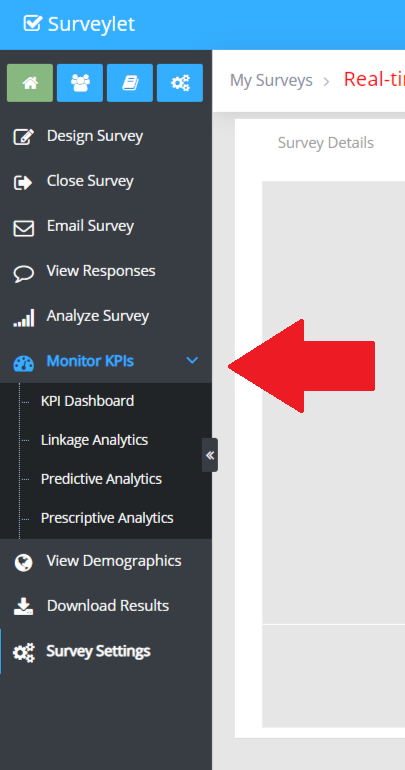
The Advanced Analytics module is available under the following menu (displayed only if you have advanced analytics subscription enabled for your account):
Detailed instructions: URL Parameters
URL Parameters are switches that control the behavior what happens when panelist clicks on the Survey URL you send them. For instance, you can send out a Survey Public URL that takes panelists to the Survey Registration page and once they register, it takes them directly to the survey.
Below is a list of "URL Parameters" that can append to "Public Survey URL" (Survey Settings --> Survey Details) to perform desired actions.
------------------------------------
URL PARAMETERS :
------------------------------------
&as=1
- THIS PARAMETER WILL BYPASS THE REQUEST SURVEY ACCESS LANDING PAGE AND LOGS YOU IN DIRECTLY.
&fullname=Tom+Cruise
- YOU CAN SPECIFY THE FULL NAME FOR THE USER. IF YOU ALLOW THE USER TO GO TO THE LANDING PAGE AND THE FULLNAME BOX IS NOT HIDDEN, THIS WILL BE PRE-FILLED FOR HIM.
|
&email=
|
tom.cruise@calibrum.com
|
- YOU CAN SPECIFY THE FULL NAME FOR THE USER. IF YOU ALLOW THE USER TO GO TO THE LANDING PAGE AND THE EMAIL BOX IS NOT HIDDEN, THIS WILL BE PRE-FILLED FOR HIM.
&username=famouscruise
- YOU CAN SPECIFY THE A USERNAME FOR THE USER. IF YOU DO NOT SPECIFY ONE, THE EMAIL WILL BE THE USERNAME.
&hidename=1
- IF THE USER IS TAKEN TO THE LANDING PAGE, THE FULL NAME TEXTBOX WILL BE HIDDEN FROM HIM. IF YOU DO NOT SPECIFY A DEFAULT FULLNAME FOR HIM IN THE "&fullname" PARAMETER, THEN A RANDOM NAME WILL BE GENERATED FOR HIM (E.G. "User 2e80a32049f742a49644ca8a97b20469")
&hideemail=1
- IF THE USER IS TAKEN TO THE LANDING PAGE, THE EMAIL TEXTBOX WILL BE HIDDEN FROM HIM. IF YOU DO NOT SPECIFY A DEFAULT EMAIL FOR HIM IN THE "&email" PARAMETER, THEN A RANDOM CALIBRUM EMAIL WILL BE GENERATED FOR HIM
(E.G. "surveylet.user.2e80a32049f742a49644ca8a97b20469@calibrum.com)
&sendmail=no
- NO SURVEY INVITATION EMAIL IS SENT TO PANELIST.
&shqtr=1
-PANELIST IS TAKEN DIRECTLY TO THE QUESTIONNAIRE.
&clearcookies=1
- CLEARS COOKIES ON CLIENT BROWSER. TO BE ABLE TO TEST THE PUBLIC URL UNDER DIFFERENT
CREDENTIALS, IT’S IMPORTANT TO CLEAR BROWSER COOKIES AS SURVEYLET RECORDS NAME/EMAIL
AFTER FIRST USE AND REUSES THEM. NOT CLEARING OUT THE COOKIES AND USING THE SAME
COMPUTER AND BROWSER WILL PREVENT YOU FROM REGISTERING DIFFERENT USERS. YOU CAN ALSO TRY DIFFERENT BROWSERS AND DEVICES WHEN REGISTERING MULTIPLE PEOPLE FOR TESTING PURPOSES, BUT EACH BROWSER,DEVICE CAN ONLY BE USED ONCE WITHOUT CLEARKING THE COOKIES.
&language=EN
- YOU CAN SPECIFY THE LANGUAGE FOR THE USER (A 2-CHARACTER INTERNATIONAL STANDARD COUNTRY CODE). IF NONE SPECIFIED, THEN YOUR ORGANIZATION'S DEFAULT LANGUAGE CODE WILL BE USED.
&gotopage=last
- YOU CAN TAKE PANELIST TO THE LAST PAGE THEY VISITED BY ADDING THE GOTOPAGE=LAST OPTION TO THE DIRECT SURVEY URL THAT IS SENT TO INDIVIDUAL PANELIST. CURRENTLY NOT WORKING WITH GENERIC SURVEY URLS.
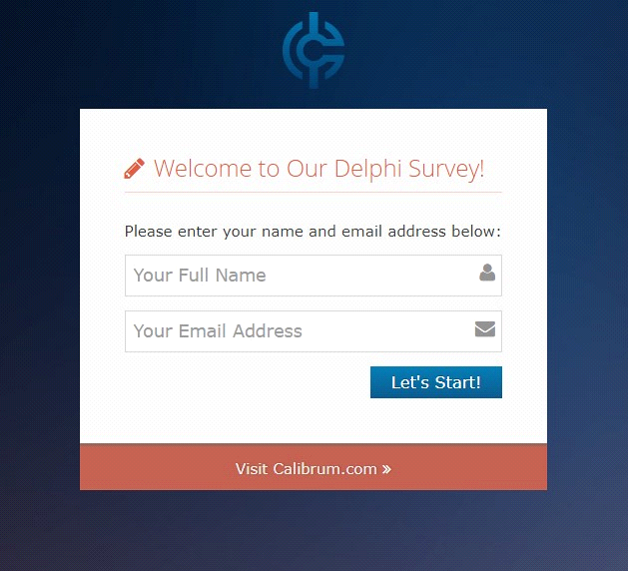
&lblheader=Welcome to our Delphi Survey!
- YOU CAN OVERRIDE THE HEADER LABEL TEXT DISPLAYED ON THE LANDING PAGE (BELOW). YOU CAN USE ANY INTERNATIONAL TEXT (E.G. GERMAN, SPANISH, ETC.)
&lblmessage=Please enter your name and email address below:
- YOU CAN OVERRIDE THE DESCRIPTION SUBTITLE LABEL TEXT DISPLAYED ON THE LANDING PAGE (BELOW). YOU CAN USE ANY INTERNATIONAL TEXT (E.G. GERMAN, SPANISH, ETC.)
&lblname=Please enter your name:
- YOU CAN OVERRIDE THE PLACEHOLDER EXPLANATION MESSAGE DISPLAYED FOR THE FULL NAME ON THE LANDING PAGE (BELOW). YOU CAN USE ANY INTERNATIONAL TEXT (E.G. GERMAN, SPANISH, ETC.)
&lblemail=Enter Your Email Address
- YOU CAN OVERRIDE THE PLACEHOLDER TEXT DISPLAYED FOR THE EMAIL ON THE LANDING PAGE (BELOW). YOU CAN USE ANY INTERNATIONAL TEXT (E.G. GERMAN, SPANISH, ETC.)
&lblstart=Let's Start!
- YOU CAN OVERRIDE THE TEXT FOR THE SUBMIT BUTTON DISPLAYED IN THE LANDING PAGE (BELOW). YOU CAN USE ANY INTERNATIONAL TEXT (E.G. GERMAN, SPANISH, ETC.)
THIS IS THE LANDING PAGE (SCREENSHOT). EACH PART OF IT CAN BE CONFIGURED WITH THE ABOVE PARAMETERS:
EXAMPLES:
1.) This is your survey's public URL, it will take you to the landing page and will request both name and email (standard behavior).
<PUBLIC_URL_PATH>
2.) This will bypass the landing page and generates both name and email for your panelists and logs them in immediately. This link can be sent to both individuals or a group of people as it is not user-specific. Once the user is logged in, a cookie will be saved on user’s computer so user won't be logged on as a new person each time he clicks on the link. Since we generated an email for him, he will not receive an additional invitation email. This can be sent to individuals or a group.
<PUBLIC_URL_PATH>&as=1&hidename=1&hideemail=1
3.) This is similar to #2 above, but it assigns a username to the recipient instead of a random username. This should only be sent to an individual person and each person should have a different username! This also specify DE (German) as the user's default language. By assigning each of your users a username, you will know who is who in your survey, otherwise you won't. This link is user-specific, and should not be sent to a group of people.
<PUBLIC_URL_PATH>&as=1&hidename=1&hideemail=1&language=DE&username=polloloco
4) This link will take your user to the landing page but will hide his name but show the email address which will default to "tom.cruise@calibrum.com". This will allow them to enter an email address if they want (but not change their fullname). If you don't specify a default email, a random email will be generated for them. If we generate an email for him, he won't receive an additional survey invitation with the survey link, in any other cases, he will. This link is user-specific, and should not be sent to a group of people.
<PUBLIC_URL_PATH>&hidename=1&email=tom.cruise@calibrum.com
5) This is same as #4 but it will also assign the polloloco as username.
<PUBLIC_URL_PATH>&hidename=1&username=polloloco
6) This link will take your user to the landing page but will hide his name but show the email address which will be blank. The user will need to enter an email to proceed. This can be sent to individuals or a group.
<PUBLIC_URL_PATH>&hidename=1
To get uploaded to Surveylet, panelists will have to opt-in first, which is done via any of the following:
Using your own email editor, send them your survey's Public URL (as shown in your survey’s Survey Setting page). For example:
( https://calibrum.net/srvcas1/accesssurvey.asp?x=0%2E568844&cn=298335653057&sn=14483355545 591&ss=4888389424 ).
This will take them to an opt-in page where they are prompted for their name/email to access the survey. Once they enter it, they will be uploaded to Surveylet and become the member of your survey's participants group.
I have several parameters you can use to further customize the text on the opt-in page, just append them to your Public survey URL.
Here are the GUI params with examples:
&lblheader=Welcome to our Delphi Survey!
&lblmessage=Please enter your name and email address below:
&lblname=Please enter your name and email below:
&lblemail=Enter Your Email Address
&lblstart=Let's Start!
2.1) Anonymous Autologin
If you don't want your panelists to bypass that opt-in page and go directly to the survey, then append a few parameters as shown below in red which will allow your panelists to bypass the landing page and go to the survey directly:
<PUBLIC_URL_PATH>&as=1&hidename=1&hideemail=1
Now, since Surveylet doesn't know who they are, it will generate a random name and Calibrum email for each panelists, so you won't be able to follow up with them.
You will see random names and emails added to your survey participants group.
2.2) Parameterized Autologin
If you know their name/email but want to bypass the opt-in page and have them access the survey directly, you can use your email editor and send them a customized personalized email with a personalized URL that will be different for each of your panelists:
<PUBLIC_URL_PATH>&as=1&hidename=1&hideemail=1&fullname=Sam+Adam&email=ssam@mycompany. com
<PUBLIC_URL_PATH>&as=1&hidename=1&hideemail=1&fullname=Jim+Bim&email=jim@mycompan y.com
If you only know their name but not their email (e.g. LinkedIn), you can simply leave out the email parameter and Surveylet will generate a random @calibrum.com email for your panelist:
<PUBLIC_URL_PATH>&as=1&hidename=1&hideemail=1&fullname=Jim+Bim
To send out individual personalized emails/URL's, you can use a HubSpot account, or LeadSparrow, JetMail or any other email providers.