Screenshots illustrate the controls below. Layouts and labels may vary with your survey configuration. Select an image or “View full size” to open it in a new tab.
Detailed instructions: Generate Direct Survey Links
If you want to use Surveylet's Direct Survey Access feature where you send out individual personalized survey links by yourself using your own email editor (and not Surveylet's email editor), and you want to keep your users' identity completely anonymous to everyone else except yourself, this section is for you.
First, let's find your survey's Direct Survey Link and add any URL parameters to it as explained
in this section. Let's say this is your survey's Direct Survey Link below:
https://www.calibrum.net/srvcas1/accesssurvey.asp?x=378437&cn=153437&sn=6923421&ss=17234344&as=1&hidename=1&hideemail=1
&clearcookies=1&sendmail=no&fullname=FIRSTNAME+LASTNAME&email=EMAILADDRESS
We will next need to replace the &fullname URL parameter (FIRSTNAME, LASTNAME values) and &email URL parameter (EMAILADDRESS value) in each Survey URL you send to each of your survey panelists.
When participants click on the above link, they will be taken to the survey directly without having to log in (i.e. bypassing the survey registration screen). No survey invitation email is going to be sent to them either due to the &sendmail=1 parameter.
If you don't have your users' email addresses, or just don't want to use them, you can generate a @calibrum.com email address in this format: surveylet.user.d30867140a8d409a8c5e6320ea1186b1@calibrum.com
Notice the "surveylet.user." prefix which we want to keep for each email. These are not actual emails and no @calibrum.com emails are actually created either. The only purpose of using these emails is for you to assign a unique email address to your panelists and identify them in your survey (which only you will know). Surveylet never sends email to these email temporary @calibrum.com addresses.
Let's generate a list of emails with random email addresses which you will add to your Direct Survey Link as the &email variable, and then send out to each of these URL's (one by one) to the users of your choice and only you will know which user received which link.
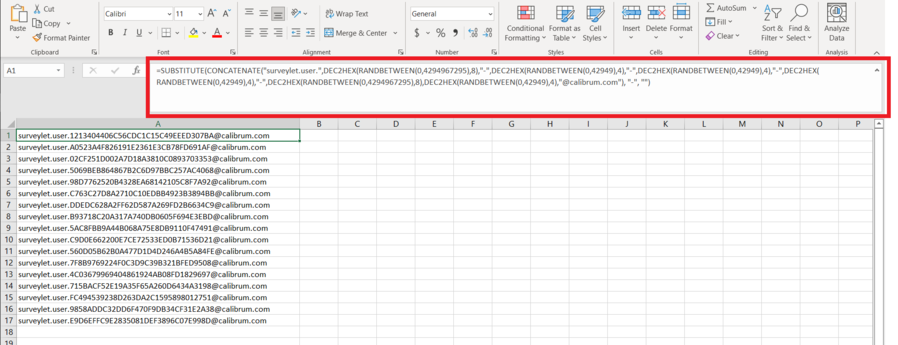
To generate a list of emails, we use Microsoft Excel. The following excel command will generate us the random email address we need:
=SUBSTITUTE(CONCATENATE("surveylet.user.",DEC2HEX(RANDBETWEEN(0,4294967295),8),"-",DEC2HEX(RANDBETWEEN(0,42949),4),"-",DEC2HEX(RANDBETWEEN(0,42949),4),"-",DEC2HEX(RANDBETWEEN(0,42949),4),"-",DEC2HEX(RANDBETWEEN(0,4294967295),8),DEC2HEX(RANDBETWEEN(0,42949),4),"@calibrum.com"), "-", "")
Just copy/paste the above text as is into your Excel cell as shown below (make sure that you use the area highlighted in red to enter the above command and not adding it directly to the cell):
You can then just click on the cell and drag it down to generate multiple random email addresses using the same format. This will allow you to generate a list of @calibrum.com email addresses and add them to your own custom Direct Survey Link. Excel allows you to generate a list of Direct Survey Links with random @calibrum.com email addresses and unique participant names.
These email addresses are hard to guess and you can rest assured that no one else but the recipient can enter them.
Detailed instructions: Survey Access Tab
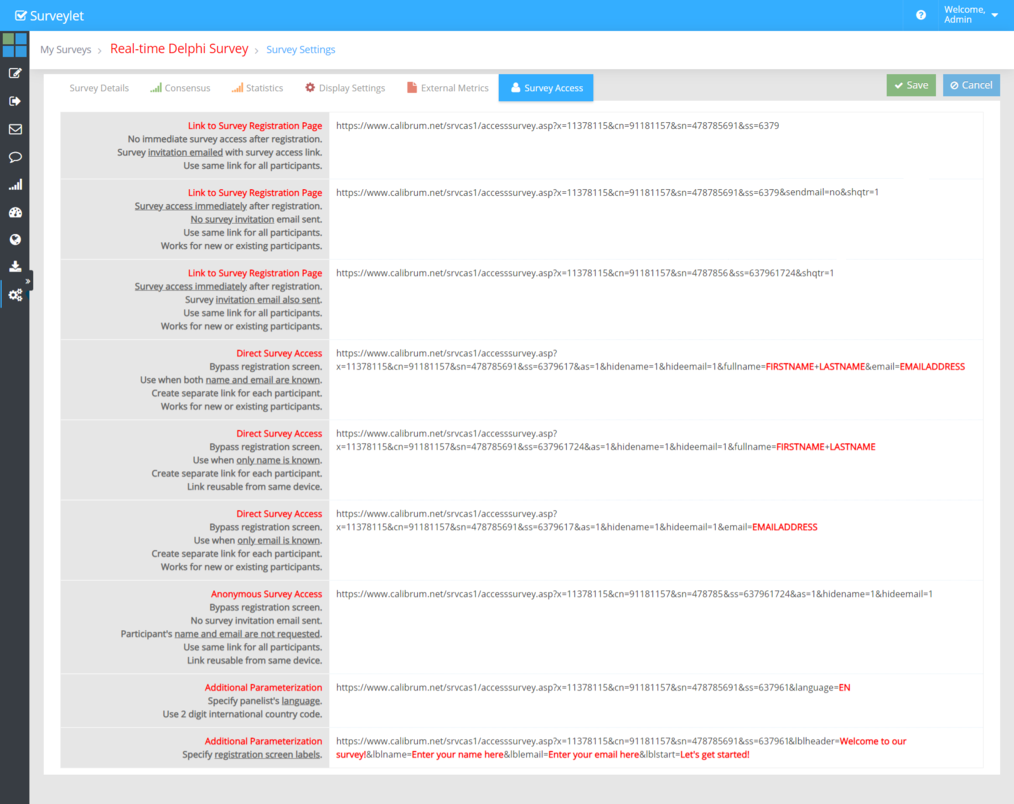
This tab displays the different options you can have your panelists access your survey. The primary means of survey access is when you upload your panelists from the Users > Import from Text page and email them their private survey link via the Email Survey page. However, you may not know your panelists email address in advance or you may want to contact them through Linked In, or maybe you just want to use your own personal Email editor to send your panelists the survey link. This tab helps you with all that.
There are several different options for you to use for survey access, depending if you want your panelists to go through the Survey Registration page or now. Depending if you want your panelists to access the survey immediately when clicking on the link, or you may want to verify their email address first. You may also want to use different languages in your survey and want to send the invitation to your panelists in their own language. A lot of options, but we have a solution for each.
You may use a set of different Email Variables in your survey URL to perform desired actions. For more information, please visit the Email Variablespage.
1) Link to Survey Registration Page. No immediate survey access after registration. Survey invitation emailed with survey access link. Use same link for all participants.
This link is a generic link that you send out to all your panelists or add to your website. When the link is clicked, the panelist is taken to the Survey Registration page where s/he is prompted for their name/email address before they can proceed. After filling out the registration page, the panelist is not taken directly to the survey, rather s/he is sent the default survey invitation email template you configured for the language of the panelist (e.g. "&language=EN", see Email variables for more information). The panelist will need to check his/her email address and click on the survey link in the invitation email to access the survey. The link is reusable and panelist can stop the survey and re-enter the survey at any time while the survey is open.
Example:
https://www.calibrum.net/.../accesssurvey.asp?x=11377315&cn=90471157&sn=402777691&ss=63222724
2) Link to Survey Registration. Page Survey access immediately after registration. No survey invitation email sent. Use same link for all participants. Works for new or existing participants.
This link is a generic link that you send out to all your panelists or add to your website. When the link is clicked, the panelist is taken to the Survey Registration page where s/he is prompted for their name/email address before they can proceed. After filling out the registration page, the panelist is taken directly to the survey. No default survey invitation email will be emailed to him/her. The link is re-usable at any time.
Example:
https://www.calibrum.net/.../accesssurvey.asp?x=11378115&cn=7737&sn=4665691&ss=6851724&sendmail=no&shqtr=1
3) Link to Survey Registration Page Survey access immediately after registration. Survey invitation email also sent. Use same link for all participants. Works for new or existing participants.
This link is a generic link that you send out to all your panelists or add to your website. When the link is clicked, the panelist is taken to the Survey Registration page where s/he is prompted for their name/email address before they can proceed. After filling out the registration page, the panelist is taken directly to the survey, and s/he is also sent the default survey invitation email template you configured for the language of the panelist (e.g. "&language=EN", see Email variables for more information). The panelist can use either links (this Survey URL and the Survey Link in the Invitation Email) to access the survey. The link is reusable and panelist can stop the survey and re-enter the survey at any time while the survey is open.
Example:
https://www.calibrum.net/.../accesssurvey.asp?x=1733115&cn=6637157&sn=4745600691&ss=637551724&shqtr=1
4) Direct Survey Access. Bypass registration screen. Use when both name and email are known. Create separate link for each participant. Works for new or existing participants.
This link is a user-specific link that you send out to individually to each panelist. Each panelist will receive his/her own configured link based on their name. When the link is clicked, the panelist is taken directly to the survey bypassing the Survey Registration page. S/he is also sent the default survey invitation email template you configured for the language of the panelist (e.g. "&language=EN", see Email variables for more information). The panelist can use either links (this Survey URL and the Survey Link in the Invitation Email) to access the survey. The link is reusable and panelist can stop the survey and re-enter the survey at any time while the survey is open.
Example:
https://www.calibrum.net/...
/accesssurvey.asp?x=11378115&cn=4334&sn=3452453&ss=43232&as=1&hidename=1&hideemail=1&fullname=FIRSTNAME+LASTNAME&email=EMAILADDRESS
You must replace the FIRSTNAME, LASTNAME and EMAILADDRESS parameters (in red) with the email recipient's information.
https://www.calibrum.net/...
/accesssurvey.asp?x=11378115&cn=4334&sn=3452453&ss=43232&as=1&hidename=1&hideemail=1&fullname=John+Smith&email=john.smith@aol.com
You cannot send the exact same link to multiple panelists as they will all go to the same questionnaire overriding each other's work. Each panelist must receive his/her own private survey link. This is where the list of URL's under the GENERATED SAMPLE block can help you.
GENERATED SAMPLE: if the panelists' email address is not available, not known or cannot be obtained, you can use a random address in your invitation link instead of valid email addresses. The value provided for email URL variable ("&email=") will be the panelists' username. The email values must be unique across all your surveys. Under this Generated Sample block, Surveylet generates 999 unique random links for you that you can use to directly send out to your panelists using your own email editor. Using these links will free you up from having to store your panelists' personal information in your Surveylet database as it will be completely anonymous and only you the survey administrator will be able to identify the panelists and, unless High Privacy settings is switched on for your survey, connect the survey responses to the panelists.

5) Direct Survey Access. Bypass registration screen. Use when only name is known. Create separate link for each participant. Link reusable from same device.
This link is a user-specific link that you send out to individually to each panelist. It's used when you do not know the email address of the panelist but you do not want them to go through the Survey Registration page. Each panelist will need to receive his/her own configured link based on their name. Since no email is provided, Surveylet will generate a @calibrum.com email for this user in the background (example: "surveylet.user.7091ae6ca704465db2a376dbc6afdac9@calibrum.com). No email invitation is sent.
Example:
https://www.calibrum.net/.../accesssurvey.asp?x=11378115&cn=4334&sn=3452453&ss=43232&as=1&hidename=1&hideemail=1&fullname=FIRSTNAME+LASTNAME
You must replace the FIRSTNAME, LASTNAME parameters (in red) with the email recipient's information. You need to make sure you are using unique name identifiers as panelists using the same name are taken to the same questionnaire and will override each others' responses.
https://www.calibrum.net/...1/accesssurvey.asp?x=11378115&cn=4334&sn=3452453&ss=43232&as=1&hidename=1&hideemail=1&fullname=John+Smith
6) Direct Survey Access. Bypass registration screen. Use when only email address is known. Create separate link for each participant. Link reusable from same device.
This link is a user-specific link that you send out to individually to each panelist. Each panelist will receive his/her own configured link based on their email address. When the link is clicked, the panelist is taken directly to the survey bypassing the Survey Registration page. S/he is also sent the default survey invitation email template you configured for the language of the panelist (e.g. "&language=EN", see Email variables for more information). The panelist can use either links (this Survey URL and the Survey Link in the Invitation Email) to access the survey. The link is reusable and panelist can stop the survey and re-enter the survey at any time while the survey is open.
Example:
https://www.calibrum.net/.../accesssurvey.asp?x=11378115&cn=4334&sn=3452453&ss=43232&as=1&hidename=1
&hideemail=1&email=EMAILADDRESS
You must replace the EMAILADDRESS parameters (in red) with the email recipient's information.
https://www.calibrum.net/.../accesssurvey.asp?x=11378115&cn=4334&sn=3452453&ss=43232&as=1&hidename=1&hideemail=1&email=john.smith@aol.com
You cannot send the exact same link to multiple panelists as they will all go to the same questionnaire overriding each other's work. Each panelist must receive his/her own private survey link.
6) Anonymous Access. Bypass registration screen. No survey invitation email sent. Participant's name and email are not requested. Use same link for all participants. Link reusable from same device.
This link is a generic survey link that you send out to a group of panelists or add it to your website. When the survey link is clicked, the panelist is taken directly to the survey bypassing the Survey Registration page. Since the identity of the panelist is not known, a @calibrum.com email address and a random name is generated for the panelist. Link is not reusable. Each click on the survey link by the same panelist will generate another questionnaire; and an additional response will be used from your available responses. Users cannot re-enter their questionnaire from a different device, or from another browser, or from the same browser if they already closed it or their session has expired. No email invitation is sent to panelist (as their email address is not known). Use this settings if you can make sure that your audience will fill out the survey in one-go and won't need to re-enter the survey.
Example:
https://www.calibrum.net/srvcas1/accesssurvey.asp?x=96714&cn=91157&sn=478691&ss=631724&as=1&hidename=1&hideemail=1
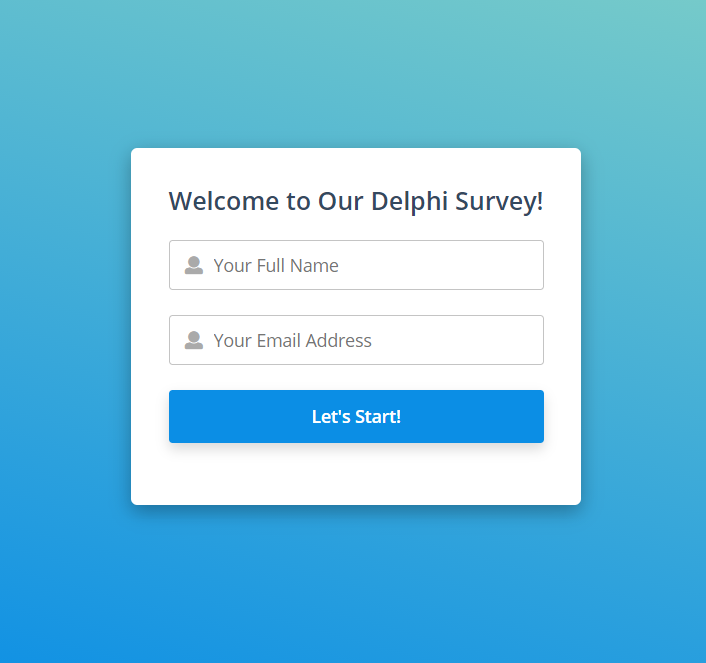
Your logo is displayed on top of the login screen if you have Survey Branding services enabled for your Surveylet account. You may configure the elements of this page and what is displayed to panelists. See Email variables for more information.
For maximum security, we recommend that you use vanity names for your panelist (such as color names, Blue Rose, Red Velvet, Yellow Sun, etc.) and assign each user a unique random value (e.g. GUID) following this syntax but with a randomized format that would be hard to guess. Change only the section that is displayed in red:
Blue Rose --> a778438ba7064baaae0a1950668d0a16
Red Velvet --> dd2253348d3c4e628e49012ce159bbc5
Yellow Sun --> 778cc958c6fe46488e54e3632110e201
https://www.calibrum.net/.../accesssurvey.asp?x=11378115&cn=4334&sn=3452453&ss=43232&as=1&hidename=1&hideemail=1&fullname=Blue+Rose&email=a778438ba7064baaae0a1950668d0a16
This will allow you to maintain the identity of your respondents on your end and panelists won't be able to guess each others' email address. Surveylet will not send email notifications to these users so keep it in mind when you use this feature as you cannot communicate with your panelists using Surveylet.