
Consensus & statistics · Administrator
Set up a RAND/UCLA (RAM) study in Surveylet
Configure nine-point ratings, “Not sure”, comments, RAM statistics, and round feedback. Understand how RAM outputs differ from standard consensus indicators.
Screenshots illustrate the controls below. Layouts and labels may vary with your survey configuration. Select an image or “View full size” to open it in a new tab.
Start here: RAM in Surveylet
This guide is for administrators implementing a RAND/UCLA Appropriateness Method (RAM) study in Surveylet. For the research background and medical applications, start with our RAM overview.
RAM statistics and standard consensus indicators are separate. The RAM agreement/disagreement settings configure RAM-related statistical outputs. They do not replace Surveylet’s general question-level consensus calculation. A Consent, Dissent, or Undetermined indicator must not be presented as a RAM appropriateness classification without checking the study’s RAM results.
Before setup, agree the rating scale, disagreement definition, exclusions, feedback schedule, and reporting requirements with your study team. Contact Calibrum to confirm the available calculation for your chosen definition, particularly for alternative or study-specific rules.
Prepare the protocol and questionnaire
- Define one judgment per item. Specify the clinical scenario, proposed action, patient group, and assumptions needed to rate appropriateness. Keep feasibility or importance as separate dimensions if your protocol includes them.
- Prepare evidence and definitions. Give panelists the same supporting information and explain the intended meaning of appropriateness.
- Confirm the panel. Document the expertise and stakeholder perspectives needed, recruitment, expected participation, and any planned subgroup analysis.
- Prespecify the analysis. Record the median classification boundaries, disagreement rule, handling of fractional medians, minimum valid ratings, non-ratings, and any additional study criteria.
- Plan the workflow. Define independent rating, feedback, discussion if included, re-rating, and when results will be frozen for analysis.
Software settings implement your protocol. They do not determine whether the study follows the classic RAM process or a documented modification.
Build the nine-point scale
Use nine ordered, scored choices with numeric values 1 through 9. Check every relevant question or matrix column, including scale labels and the Likert-scale setting. Keep the scored scale in order.
| Scale region | Meaning for the rating task |
|---|---|
| 1–3 | Inappropriate |
| 4–6 | Uncertain / equivocal |
| 7–9 | Appropriate |
These regions describe the scale. The item’s final classification also depends on the panel median and disagreement rule; one panelist’s rating is not the group classification.
For a matrix, treat each rated scenario or item as a separate analysis unit. Confirm which columns collect appropriateness and which collect another dimension. See matrix setup and question settings.
Add “Not sure” and qualitative feedback
Use Surveylet’s virtual I don’t know option, which can be relabeled Not sure. It is a non-rating, separate from the nine scored choices. In Question Settings, review Display I don’t know; for a matrix, review the equivalent column controls.
Use Display My Comment to collect a rationale alongside each item, and configure the comment label as Offer feedback where appropriate. Decide whether comments are optional, required, or required for particular choices, then test the participant view.
“Not sure” is different from an uncertain rating. An uncertain/equivocal score remains a numeric judgment on the scale. A virtual “Not sure” answer means the panelist cannot provide a scored judgment. Keep it out of medians and percentile calculations and report its frequency separately.
Do not add “Not sure” as a tenth scored choice or treat it as score 0 or 5. Check exports and the valid-rating denominator against the agreed exclusions. See response counts and non-ratings.
Enable RAM and confirm the definitions
- Open your survey and select Survey Settings → Consensus.
- Set Enable RAND/UCLA Appropriateness Method (RAM) to Yes.
- Review Definition of Agreement (RAM) and Definition of Disagreement (RAM) against your protocol.
- Confirm with Calibrum which calculation is available for the selected options and what their parameters require.
- Save the settings and test the relevant statistical outputs with known ratings.
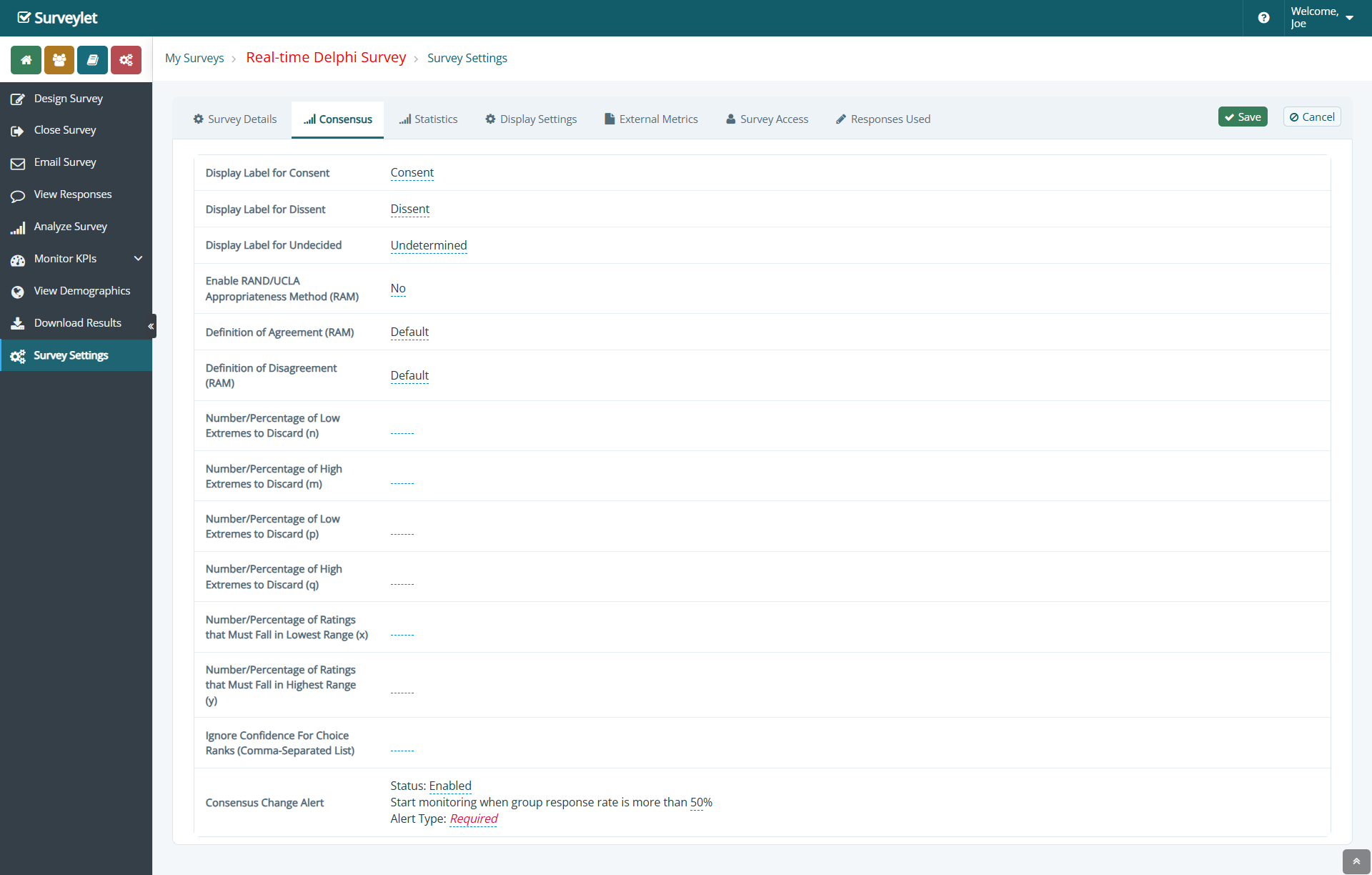
Default is a menu choice, not a methodological definition. Record the actual calculation and parameter values used for the study. Enabling RAM does not automatically convert the general consensus indicator into a RAM decision.
Understand the definition menus and parameters
The menus expose several approaches. Their labels indicate the intended rule; the availability and configuration of a particular calculation should be confirmed before it is used in a study.
| Menu family | What to confirm |
|---|---|
| RAM/IPRAS | The comparison between the interpercentile range and its symmetry-adjusted threshold. This assesses disagreement; absence of disagreement is not necessarily strict agreement. |
| RAM/Strict | The menu describes concentration within one region for agreement and opposing extreme scores for disagreement. Confirm the exact rule. |
| RAM/Relaxed | The menu describes range-based conditions for agreement and opposing low/high regions for disagreement. Confirm the exact range rule and thresholds. |
| Variants with Extremes | Specify any low/high ratings discarded for that rule, then apply the selected definition to the remaining ratings. Do not assume trimming applies to every statistic. |
| Default | Ask which implemented definition and parameters it resolves to. Do not report “Default” alone in the methods section. |


The settings show n and m for low/high extremes in agreement definitions, p and q for extremes in disagreement definitions, and x and y for low/high rating thresholds where the selected rule uses them.
Confirm whether each entered value is a count or a percentage, which ratings it applies to, and how rounding is handled for small panels. Leave parameters unused by your selected definition out of the analysis description. A percentage-based threshold and a fixed number of panelists can produce different decisions.
Enable and read the RAM statistics
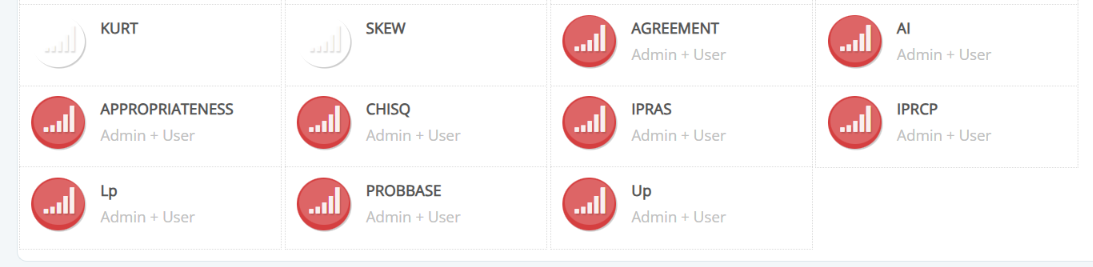
Open Survey Settings → Statistics and enable the measures required by your protocol before collecting data. Review whether each is Admin Only, Admin + User, or Disabled, then check the question’s statistics display list and participant analytics permissions.
| Output / label | Meaning and use |
|---|---|
| Median | The central valid rating. Interpret it together with disagreement. |
| Lp and Up | Lower and upper percentile limits for the configured interpercentile range. In the standard IPRAS approach, these are P30 and P70. |
| IPR | Interpercentile range: Up − Lp. It can also be calculated from the displayed limits if it is not shown as a separate measure. |
| IPRCP | Central point of that range: (Lp + Up) / 2. |
| AI | Asymmetry index: the absolute distance between IPRCP and 5 on the nine-point scale. |
| IPRAS | Symmetry-adjusted threshold used in the IPR-based disagreement assessment. |
| Agreement | Output associated with the chosen RAM definition. Confirm its coding and distinguish it from a percentage-agreement measure. |
| Appropriateness | RAM-related classification output. Check its coding and compare it with the prespecified median/disagreement rule. |
| Disagreement index (DI) | IPR / IPRAS. If not available as a displayed or exported field, calculate it from confirmed component values in the analysis dataset. |
The Statistics menu also contains other measures, including CHISQ and PROBBASE. Their presence does not make them RAM classification criteria. Include only the measures your analysis plan needs and confirm the meaning of any additional output.
Newly enabled statistics may not have historical values for earlier answer events. Review statistics and history before enabling additional measures during an active study.
Understand the IPRAS calculation
For the standard nine-point IPRAS approach, the components are:
IPR   = P70 − P30
IPRCP = (P30 + P70) / 2
AI    = |5 − IPRCP|
IPRAS = 2.35 + (1.5 × AI)
DI    = IPR / IPRAS
The RAND manual identifies disagreement when IPR > IPRAS, equivalently DI > 1. Some publications use an inclusive boundary. Prespecify how equality is handled and confirm that your implementation matches it. The percentile calculation convention must also be recorded and checked.
Do not divide IPR by a fixed 2.35 for every item: IPRAS changes with the asymmetry of its rating distribution. See the RAND manual, Chapter 8, and the published disagreement-index example.
| Illustrative percentile limits | Calculation | Result |
|---|---|---|
| P30 = 7; P70 = 9 | IPR = 2; IPRCP = 8; AI = 3; IPRAS = 6.85; DI ≈ 0.292 | No disagreement under this IPRAS comparison. Check the median to determine appropriateness. |
| P30 = 2; P70 = 8 | IPR = 6; IPRCP = 5; AI = 0; IPRAS = 2.35; DI ≈ 2.553 | Disagreement under the IPRAS comparison. |
These are original teaching examples using assumed percentile limits, not patient data or Surveylet output screenshots. They do not establish the complete rating distribution or its median.
Classify the item and keep the outputs distinct
For the conventional classification described in published RAM studies, use the panel median together with the selected disagreement assessment:
| Median region | Disagreement | RAM classification |
|---|---|---|
| 1–3 | Absent | Inappropriate |
| 4–6 | Absent or present | Uncertain |
| 7–9 | Absent | Appropriate |
| Any median | Present | Uncertain |
For fractional medians such as 3.5 or 6.5, define the boundary treatment in the protocol. If too few valid ratings remain, follow the study’s insufficient-data rule rather than assigning a confident classification.
For example, a median of 8 with disagreement is uncertain under this RAM rule. A median of 5 with no disagreement is also uncertain; the reasons differ. Report the underlying median and disagreement result so readers can distinguish them.
Surveylet’s ordinary range consensus or percentage-agreement result can differ from a RAM classification because it uses a separate calculation. Check the RAM statistics and confirmed classification output, or derive the classification from the exported data. Do not use the ordinary consensus status as a shortcut.
Agreement definitions, absence of disagreement, appropriateness, and round-to-round stability answer different questions. A study can retain additional criteria, but should describe them as its prespecified rules rather than assuming they are all part of classic RAM.
Plan feedback, discussion, and re-rating
Choose the feedback that panelists need: their own rating, the group distribution, selected numerical summaries, and relevant anonymized comments. Decide which statistics are for the study team only; participants do not need every technical measure.
The classic process includes independent first ratings, a moderated discussion, and subsequent ratings. Online adaptations can change the delivery format. The study report should identify what was retained or modified, including whether discussion occurred. See the web-based RAM review.
For a staged design, configure feedback timing to match your protocol. If you use continuous Real-Time Delphi feedback instead, document that adaptation. A round snapshot freezes a stage; the minimum-answer threshold controls when feedback appears. Neither defines the RAM disagreement rule or the study’s stopping rule.
Check the setup before launch
- Check the scale: values 1–9, labels, order, and each relevant matrix column.
- Check non-ratings: “Not sure” remains separate from numeric scores, including after changing an answer.
- Check comments: save a comment, revise it, and verify the selected feedback visibility.
- Check definitions: record the selected implemented RAM rules and all applicable parameters.
- Check reference patterns: unanimous low, middle, and high ratings; polarization; asymmetric distributions; and a boundary case.
- Check exclusions: distinguish test records, missing answers, non-ratings, and the latest saved rating for each panelist/item/round.
- Check outputs: compare medians, percentile limits, IPRAS, and classification with an independently calculated reference dataset using the same conventions.
- Check the participant view: desktop, mobile, keyboard navigation, required-field messages, and permitted analytics.
- Check round transitions: confirm which dataset and feedback are used at each stage.
- Keep the record: retain the protocol, settings, validation examples, round dates, and exports.
These checks are study-specific. A screenshot of an enabled option does not verify a calculation.
Export and report the study
Use Download Results to obtain the relevant ratings and comments. Confirm the survey, round, item or matrix cell, subgroup filters, exclusions, and output coding before analysis.
A useful item-level table contains the item/scenario identifier, round, valid-rating count, “Not sure” count, median, selected disagreement measure, and final classification. Include distributions or additional dimensions where the protocol requires them. Retain comments as a separate qualitative dataset linked to the correct item.
In the methods and results, explain panel selection, evidence preparation, rating instructions, feedback and discussion, participation by round, item revisions, calculation conventions, and any changes from the planned procedure. The web-based RAM review highlights the importance of reporting how the panel process was conducted. See also our Delphi reporting guide.
Get help implementing your RAM study
We recommend Complete Survey Care for teams setting up a RAM study in Surveylet. Within the purchased hours and agreed scope, it can cover questionnaire programming, configuration of confirmed RAM settings, “Not sure” and comment controls, pre-launch testing, feedback and round setup, and help preparing data outputs.
Your study team supplies the questionnaire, evidence materials, and protocol and retains scientific and clinical decisions. Full methodology leadership, comprehensive statistical analysis, and a professionally written final report are separately scoped when required.
To assess the support needed, send your draft questionnaire, intended RAM rules, panel size, planned rounds, and launch date. Explore Complete Survey Care or discuss your RAM setup with Calibrum.
References and further reading
- Fitch K, et al. The RAND/UCLA Appropriateness Method User’s Manual. RAND; 2001. See Chapter 8 for classification and disagreement definitions.
- Sparks JB, et al. Planning and Reporting Effective Web-Based RAND/UCLA Appropriateness Method Panels: Literature Review and Preliminary Recommendations. Journal of Medical Internet Research. 2022;24(8):e33898. PubMed record.
- Milton-Jones H, et al. An international RAND/UCLA expert panel to determine the optimal diagnosis and management of burn inhalation injury. Critical Care. 2023;27:459. A published example of median ratings and disagreement-index analysis.
Common questions
Does enabling RAM change the standard consensus calculation?
No. RAM settings control RAM-related statistical outputs. Surveylet’s general consensus indicators use separate question-level settings. Interpret and report the RAM results using the confirmed study rules.
Is “Not sure” the same as a score in the uncertain region?
No. The virtual “Not sure” option is a non-rating. Scores in the uncertain/equivocal region are numeric judgments. Keep non-ratings outside scored calculations and report them separately.
Does every definition shown in the menus work for every study?
Confirm the available implementation and parameter requirements with Calibrum before choosing a definition, especially a nondefault or study-specific rule. Menu availability alone is not confirmation of a tested configuration.
Can I calculate a disagreement index if it is not displayed?
Yes, in your analysis dataset, using confirmed IPR and IPRAS values: DI = IPR / IPRAS. Use the same percentile, exclusion, and boundary conventions as the study protocol.
Is a high percentage of appropriate ratings enough for RAM classification?
Not by itself under the conventional median/disagreement approach. Check the median and selected disagreement rule. A percentage threshold can be an additional prespecified study criterion.
Do we have to purchase Complete Survey Care?
It is optional. We recommend it when your team wants hands-on Surveylet implementation and operational support for a RAM study. The scope and available hours are agreed before work begins.