Create a closed survey, give it a useful title, and connect the correct participant and administrator groups.
Updated October 12, 2026
Screenshots illustrate the controls below. Layouts and labels may vary with your survey configuration. Select an image or “View full size” to open it in a new tab.
Create the survey
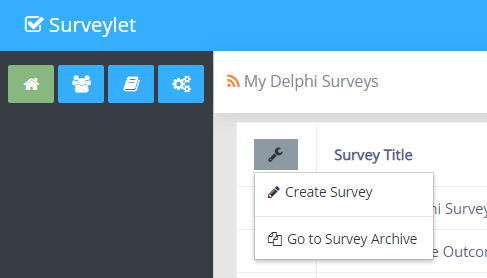
From your survey list, choose Create Survey.
Enter the survey title. Confirm the field edit using the check-mark control; navigating away before committing the edit can lose it.
Select the Survey Participants group and the administrator group.
Select the privacy level and consensus method. Review the intended survey design languages.
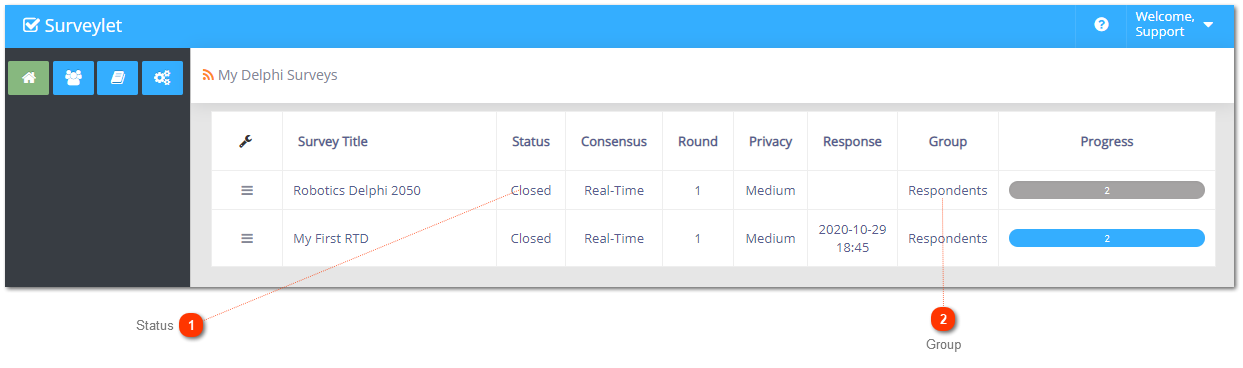
Save the new survey. It appears in My Delphi Surveys with its status set to Closed.
Open the survey title to review the additional settings, then use Design Survey to build it.
A survey is assigned to one participant group. A group can be used by several surveys, and a user can belong to several groups. Administrator groups determine who can manage the survey.
Choose groups carefully before collecting data. Switching the participant group can remove answers belonging to people who are not in the replacement group. Export first and check membership before changing a live survey.
Survey titles do not have to be unique. Use a title that distinguishes the study, language, or testing copy from other projects. Do not use a new survey merely to represent another round of the same study unless your design requires separate surveys. Use Survey Rounds for the round workflow.
Detailed instructions: Create New Survey
The first step toward building your survey starts with adding a new blank survey from the Create Survey menu. Blank surveys are surveys you build from scratch.
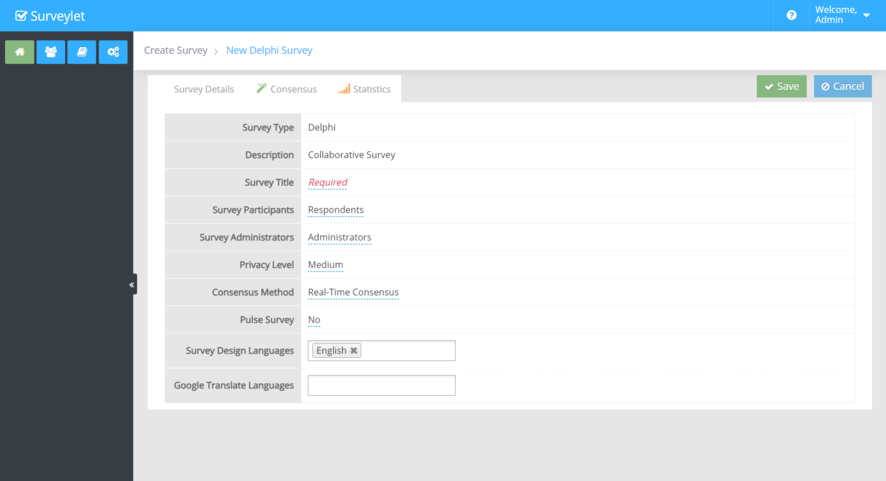
Next, you are taken to the new survey page where you are prompted to enter information about your survey
Survey Type
Delphi. This setting is read-only and cannot be changed
.
Description
Collaborative Survey. This setting is read-only and cannot be changed.
Survey Title
The title of the survey. It is a required field. Click on the red "Required" text and enter the title. Survey titles do not need to be unique in Surveylet, so more than one survey can have the same title. Make sure you click on the blue pipe icon when you are done entering the title otherwise the survey title won't be recorded.
Survey Details
When you add a new survey, there are 3 tabs showing for your table grid: the Survey Details tab, the Consensus tab and the Statistics tab. The Survey Details tab contains settings for your survey. Most will appear first with default values, only the Survey Title setting will need to be entered as it is a required field.
Survey Participants
In Surveylet, each survey is assigned to a Group. A Group is a collection of one or more Users which you can manage from the Groups page. A Group can be assigned to multiple surveys. The Group that is assigned to the survey is called the "Survey Participants" group. You can change the group to another group at any time, but note that users who are not member of the new group will lose their responses which cannot be recovered.
Admins
The name of the group whose members will have the right to administer this survey. Only admin groups can be assigned to the survey. See Groupsfor more information.
Privacy Level
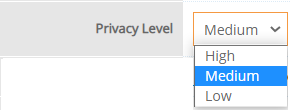
Privacy is a very important part of Delphi surveys. The level of privacy determines if panelists identity will be revealed to each other or to the survey administrator only, or kept secret to everyone. Once the privacy level is set and the survey has received at least one response, the privacy level cannot be changed any more, unless you delete all data collected in your survey and then reset the privacy level. There are 3 levels of privacy as shown below:
The Low privacy level means that there is no privacy enabled and survey panelists can identify each other and connect answers to other panelists. Survey administrators can also identify panelists and their answers, and see their name, email address, username, language used, date and time of response and other metadata information
The Medium privacy level (which is the default) means that only survey administrators will be able to identify panelists and their responses, but survey panelists cannot identify each other.
The High privacy level means that nor the survey administrators nor the survey participants can identify anyone in the survey, everyone's identity will be kept secret and cannot be revealed on any pages.
Consensus method
The Consensus method is the actual Delphi method you want to apply and use in your survey. It can be either Real-time Consensus for Real-time Delphi surveys; or Multi-round Consensus for Multi-round Delphi surveys. You can change this option at any time even while the survey is running without any adverse affect (i.e. without losing data); it will only affect which data set your panelists will see which in Real-time Delphi all answers collected and analyzed up to that point in current survey round; or in Multi-round Delphi the answers analyzed at the end of the last survey round.
Pulse Survey
If you want to send out only a single page in your large survey, this option can come handy. When you send out the survey invitation email from the Email Survey page to your panelists, they receive the survey invitation link in an email which will take them to the survey but instead of letting them step through all pages of the survey, it will pick only a single page. You can set the order of the pages that are presented to your user each time you send out a new survey invitation email: Continuous Page Order which will start from page 1 and continues to last page; or Randomized Page Order which will pick a page randomly. For more information, see Email Survey help page.
Survey Design Languages
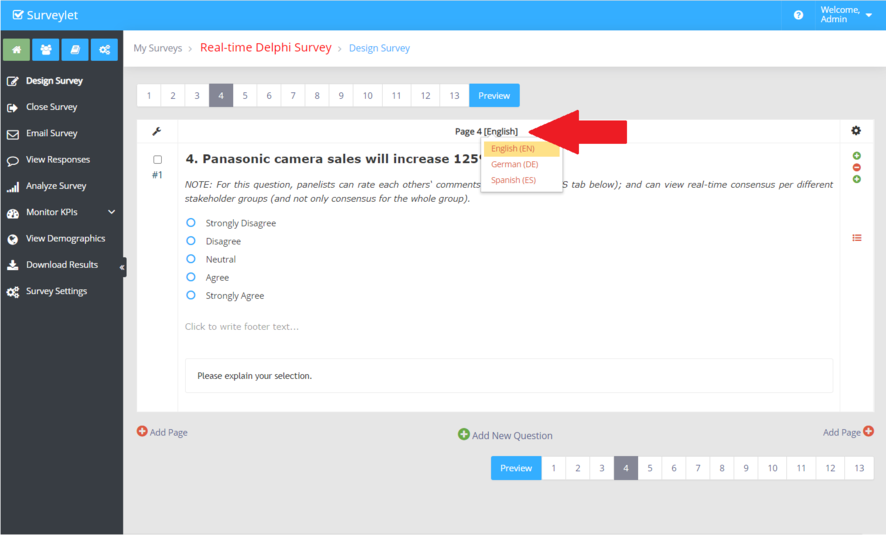
This is the list of languages you want to design the survey in. The default is your organization's default language the is configured from the Account page using the Default Language option. If you are planning to design multilingual surveys, you have the option to use Google Translate to automatically translate your questions and participants' answers; or you can define the translations yourself. For more information see the Languagehelp page. You can add a language at any time. When you delete an existing language, the language translation for all questions will also be removed and cannot be restored later by re-adding the language. The Survey Design Languages listed here do not need to be added to Google Translate Languages list, meaning that you can design a language in English only and display it in Italian and Chinese. In the Survey designer, the languages listed in the "Survey Design Languages" will be available for selection from the language dropdown as shown below:
Google Translate Languages
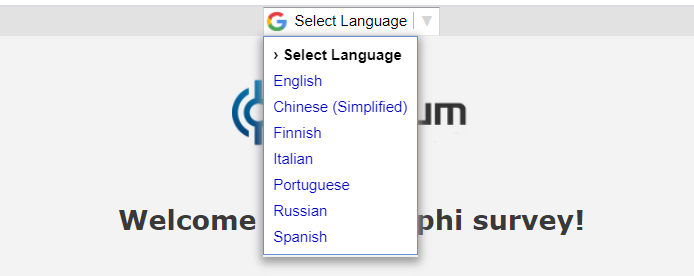
List the languages that will be displayed to your panelists on top of the survey pages if their Google translate option is switched on.
When you are done, click on the icon to create your survey. You are then taken to the My Delphi Survey page where your survey will appear with its Status set to Closed:
Click on title of the survey under the Survey title column. This will take you to the Survey Settings page and review and adjust addition settings that were not visible when you were adding the new survey.
Detailed instructions: My Delphi Surveys
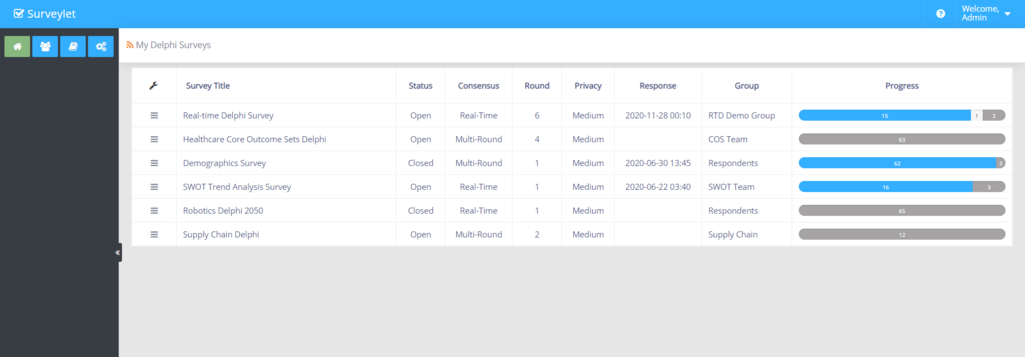
When you login to your Surveylet account, you arrive at the 'My Delphi Surveys' page listing all the surveys you have created. This page provides you a quick overview about the current status and the progress of your surveys.
Survey Title
Title of the survey. Displays the short titles of your surveys.
Status
Survey Status. Can either be Open or Closed. A new survey is always created with Closed status which you should leave as is until you are ready to launch it and invite panelists to your survey. You can open and close your surveys at any time; it will toggle the accessibility of surveys.
Consensus
Method of Consensus. This settings determines which Delphi method you are using in your survey: either Real-time, or Multi-round.
Round
Current Survey round. Survey rounds are specific to Delphi surveys. A survey round is a snapshot of a survey at a point in time. Survey rounds are built on the same questions in your survey. While originally survey rounds were only used in Multi-round Delphi surveys, Surveylet allows you to create Survey Rounds in Real-time Delphi surveys as well where each round will be a Real-time survey. The Rounds columns shows which round of the survey is currently in. The current round is always the most recent round. You cannot activate an earlier round, only if you delete all rounds after that.
Privacy
Survey Privacy. An important part of Delphi projects. Depending on who can identify whom in a survey, there are 3 different privacy level available in Surveylet: Low, Medium and High. In a survey with Low Privacy, both survey administrators and survey panelists can identify everyone (name, email). In Medium privacy, only survey administrators can identify survey panelists, but survey panelists cannot identify other survey panelists. High Privacy, nor the survey administrators, nor the survey panelists can identify anyone in the survey. Be careful, if it is set to Low, every panelist can see the ID of other respondents. Once the privacy settings is set and there is at least one responses received in the survey, the privacy setting cannot be changed; to change it, survey administrator will need to delete all responses first.
Responses Used
Displays the number of all responses used across all survey rounds. One response is a panelist's response to the entire survey, so the same person's response is counted only once even if the survey has multiple rounds. The responses deleted by survey admins are also included. Deleting a survey response will not reduce the Responses Used. To see the list of responses used for the survey, go to 'Survey Settings > Responses Used' tab. To see responses used for the entire account, go to 'Account Settings > Response History' tab.
Last Response
Date of Last Survey Response Received. A Survey Response is a response by a survey panelists to the entire survey. The time shown is displayed in the time zone set for your user account. The default time zone for newly added users is "UTC Coordinated Universal Time". To change it, go to your User Profile and edit the Time Zone settings.
Group
Survey Participants Group. A survey in Surveylet must be assigned to a Group which consists of one or more Users. You can create many groups. A Group can be assigned to multiple surveys, but a survey can only be assigned to a single Group. The group assigned to a survey is called Survey Participants group. The group is hyperlinked and when you click on the group title, it will send the default survey invitation email to all panelists within the group (emails will be sent out one by one, and not as a group email).
Progress
Survey Progress. The percentage of questions panelist answered out of all answers marked as "Include In Progress". You can see information about how the panelists progress throughout the survey. There are 3 different types of progress: Not started; Started, and Completed. Each type is marked with different background color in the progress bar: Not Started (dark gray), Started (light grey), Completed (blue). Within each progress type, there is a number in squared brackets, e.g. [17]. It means that there are 17 participants within that specific category. The number is also hyperlinked, and when you click on it, it will trigger the sending of specify emails to the relevant people. The email template that is sent out is based on which progress you clicked on. If you click on Not started, then the Reminder to Start email template is sent to all panelists who have not yet started the survey. If you click on Started, then the Reminder to Finish email template is sent to all panelists who have started but not yet completed the survey. If you click on Completed, then the Thank You email template is sent to all panelists who have completed the survey at 100%.
Survey Archive
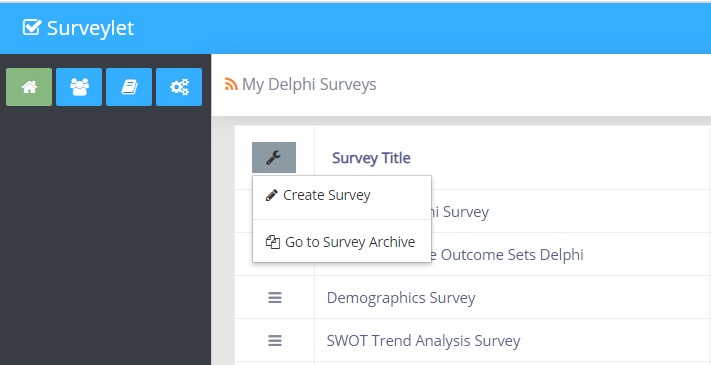
Takes you to the survey archive. Archived surveys are surveys that are not listed on the main My Delphi Surveys page, but on a separate Archived Survey page. You can archive and unarchive any surveys at any time. Archived surveys are not deleted, only moved to the survey archive. To access the survey Archive, select the "Go to Survey Archive" menu from the table dropdown menu:


 icon to create your survey. You are then taken to the My Delphi Survey page where your survey will appear with its Status set to Closed: