Screenshots illustrate the controls below. Layouts and labels may vary with your survey configuration. Select an image or “View full size” to open it in a new tab.
Consensus measures, group stability, and status
Consensus decision-making or consensus politics is group decision-making processes in which participants develop and decide on proposals with the aim, or requirement, of acceptance by all. The focus on avoiding negative opinion differentiates consensus from unanimity, which requires all participants to positively support a decision.
Consensus measurement is the central part of a Delphi survey. To be able to measure group agreement, Surveylet calculates four consensus-related measures: consensus score, choice of consensus, group stability, stability threshold and consensus status.
Available Statistics to use to calculate consensus score:
The most votes. There are two types of majorities:
1) Absolute Majority: if one choice received more than 50% of all votes, then it has obtained an absolute majority;
2) Simple Majority: occurs when one choice receives more votes than any other choices. The choice of consensus does not necessarily have to earn 50% or more of the votes. A choice can win consensus with just 40%, 30%, or even fewer of the total votes, depending on how many other choices are there to choose from.
The middle number; found by ordering all data points and picking out the one in the middle (or if there are two middle numbers, taking the mean of those two numbers).
The most frequent number - that is, the number that occurs the highest number of times.
The "average" number; found by adding all data points and dividing by the number of data points.
Consensus status defined by Interquartile Range (IQR) and Standard Deviation (StDev). IQR is also known as "midspread" or "middle 50%" or "fourth spread" as it gives you the range of the middle half of a data set. The standard deviation is a measure of the amount of variation of the values of a variable about its mean. A low standard deviation indicates that the values tend to be close to the mean of the set, while a high standard deviation indicates that the values are spread out over a wider range. The standard deviation is commonly used in the determination of what constitutes an outlier and what does not. When this option is used the choice of consensus will be determined by the Median, and the strength of consensus (Group Stability) will be determined by the Coefficient of Variation.
CONSENSUS IN: Interquartile range ≤ 1 and standard deviation ≤ 1.5.
CONSENSUS OUT: Everything else.
Your Likert-scale is divided into 2 ranges with default range labels "Low/High" configurable through the RANGE LABEL question/matrix column settings. For more information about choice range allocation, click
here.
CONSENSUS IN: (x)% or more participants overall scoring within any given range, where (x) is configurable through the Stability Threshold question/matrix column setting (default is 70%).
CONSENSUS OUT: Everything else.
Your Likert-scale is divided into 2 ranges with default range labels "Low/High" configurable through the RANGE LABEL question/matrix column settings. For more information about choice range allocation, click
here.
CONSENSUS IN: (x)% or more participants overall scoring in the Highest range, where (x) is configurable through the Stability Threshold question/matrix column setting (default is 70%).
CONSENSUS OUT: Everything else.
Your Likert-scale is divided into 3 ranges with default range labels "Low/Medium/High" configurable through the RANGE LABEL question/matrix column settings.
When Range Consensus is used, the choices of consensus will be the range with that received the most votes. If given range has received the percentage of votes specified by your Stability Threshold, consensus is established.
Example for 3-range consensus with 70% of stability:
If over 70% of people voted for choice 1, 2 or 3, then Range 1 (Low) will be the consensus. If over 70% of people voted for choice 4, 5 or 6, then Range 2 (Medium) will be the consensus. If over 70% of people voted for either choice 7, 8 or 9, then Range 3 (High) will be the consensus. You can speficy Range Labels in your Question or Matrix Column property settings.
For more information about choice range allocation, click
here.
CONSENSUS IN: (x)% or more participants overall scoring within any given range, where (x) is configurable through the Stability Threshold question/matrix column setting (default is 70%).
CONSENSUS OUT: anything else.
Your Likert-scale is divided into 3 ranges with default range labels "Low/Medium/High" configurable through the RANGE LABEL question/matrix column settings. For more information about choice range allocation, click
here.
CONSENSUS IN: (x)% or more participants overall scoring in the Highest range, where (x) is configurable through the Stability Threshold question/matrix column setting (default is 70%).
CONSENSUS OUT: Everything else.
Your Likert-scale is divided into 3 ranges with default range labels "Low/Medium/High" configurable through the RANGE LABEL question/matrix column settings. For more information about choice range allocation, click
here.
CONSENSUS IN: (x)% or more participants overall scoring as 7 to 9 AND < 15% participants scoring as 1 to 3, where (x) is configurable through the Stability Threshold question/matrix column setting (default is 70%).
CONSENSUS OUT: Everything else.
Your Likert-scale is divided into 3 ranges with default range labels "Low/Medium/High" configurable through the RANGE LABEL question/matrix column settings. For more information about choice range allocation, click
here.
CONSENSUS IN: (x)% or more participants overall scoring as 7 to 9 AND < 15% participants scoring as 1 to 3, where (x) is configurable through the Stability Threshold question/matrix column setting (default is 70%).
CONSENSUS OUT: < 15% participants overall scoring as 7 to 9 AND (x)% or more participants scoring as 1 to 3, where (x) is configurable through the Stability Threshold question/matrix column setting (default is 70%).
UNDETERMINED: Everything else.
Your Likert-scale is divided into 3 ranges with default range labels "Low/Medium/High" configurable through the RANGE LABEL question/matrix column settings. For more information about choice range allocation, click
here.
CONSENSUS IN: (Patient-weighted vote): an outcome is included if (x)% or more of all participants score it as 7 to 9 and less than 15% score it as 1 to 3, or if more than (x)% of the patient group scores it as 7 to 9, where (x) is configurable through the Stability Threshold question/matrix column setting (default is 70%).
CONSENSUS OUT: An outcome is excluded if 50% or fewer participants in each stakeholder group score it as 7 to 9.
UNDETERMINED: Everything else.
NOTE: The "Patients" stakeholder group must contain the title "Patient"; otherwise Surveylet will use the first choice in the Stakeholder demographics question.
Your Likert-scale is divided into 3 ranges with default range labels "Low/Medium/High" configurable through the RANGE LABEL question/matrix column settings. For more information about choice range allocation, click
here.
CONSENSUS IN: (x)% or more participants overall scoring as 7 to 9 AND < 15% participants scoring as 1 to 3, where (n) is configurable through the Stability Threshold question/matrix column setting (default is 70%).
CONSENSUS OUT: 50% or fewer participants scoring as 7 to 9.
UNDETERMINED: Everything else.
NOTE: The 70% value is set by the STABILITY THRESHOLD option therefore can be adjusted.
Your Likert-scale is divided into 4 ranges with default range labels "Very Low/Low/High/Very High" configurable through the RANGE LABEL question/matrix column settings. For more information about choice range allocation, click
here.
CONSENSUS IN: (x)% or more participants overall scoring within any given range, where (x) is configurable through the Stability Threshold question/matrix column setting (default is 70%).
CONSENSUS OUT: Everything else.
Your Likert-scale is divided into 4 ranges with default range labels "Very Low/Low/High/Very High" configurable through the RANGE LABEL question/matrix column settings. For more information about choice range allocation, click
here.
CONSENSUS IN: (x)% or more participants overall scoring in the Highest range, where (x) is configurable through the Stability Threshold question/matrix column setting (default is 70%).
CONSENSUS OUT: Everything else.
Your Likert-scale is divided into 5 ranges with default range labels "Very Low/Low/Neutral/High/Very High" configurable through the RANGE LABEL question/matrix column settings. For more information about choice range allocation, click
here.
CONSENSUS IN: (x)% or more participants overall scoring within any given range, where (x) is configurable through the Stability Threshold question/matrix column setting (default is 70%).
CONSENSUS OUT: Everything else.
Your Likert-scale is divided into 5 ranges with default range labels "Very Low/Low/Neutral/High/Very High" configurable through the RANGE LABEL question/matrix column settings. For more information about choice range allocation, click
here.
CONSENSUS IN: (x)% or more participants overall scoring in the Highest range, where (x) is configurable through the Stability Threshold question/matrix column setting (default is 70%).
CONSENSUS OUT: Everything else.
Summary of when to use the mean, median and mode Please use the following summary table to know what the best measure of central tendency is with respect to the different types of variable.
|
Type of Variable
|
Best measure of central tendency
|
|
Nominal
|
Mode
|
|
Ordinal
|
Median
|
|
Interval/Ratio (not skewed)
|
Mean
|
|
Interval/Ratio (skewed)
|
Median
|
For information about choice range allocation for Range 2, 3, 4, 5 consensus measures, click
here.
For multi-selection questions, the choice of Consensus is calculated and its value is coming from the Consensus Score. The nearest whole number to the consensus score will be the choice of consensus. E.g. if consensus score is 4.69, the choice of consensus will be the choice that is ranked at position #5 starting with the 1st choice at Rank #1. if consensus score is 3.13, the choice of consensus will be the choice that is ranked at position #3 starting with the 1st choice at Rank #1.
The group stability indicates the strength of consensus, or level of consensus. Basically, how strong the agreement on the choice of consensus between all respondents. Available Statistics to use to calculate Group Stability:
- Coefficient of Variation (recommended for rating scale questions): it measures the deviation from the mean; the closer the responses to the mean, the stronger the group stability. The farther responses are from the mean, the weaker group stability is.
- Percentage (recommended for categorical questions - also known as qualitative questions or attribute questions): the group stability will be the percentage of people that selected the choice of consensus.
0-100%. If there is single polar consensus, the stability threshold must be met for consensus to be achieved. Stability threshold value can be anywhere between 0 and 100%, with 100% meaning unanimous agreement.
Consensus status value can be Disagreement (Dissent) or Agreement (Consent) or Undecided (Undetermined). These Consensus Status labels can be configured from Survey Settings > Consensus tab. The Consent status requires that a Choice of Consensus is established with a Group Stability that is greater than the Stability Threshold.
Detailed instructions: Consensus Tab
This page is informational purposes only. It lets you know the default consensus metrics for Likert scale questions, default statistical measure for Group Stability calculation, default value for Stability Threshold measurement, and so on. You can still change all the settings on a question-by-question basis later on in your survey, these settings are just default guidelines.
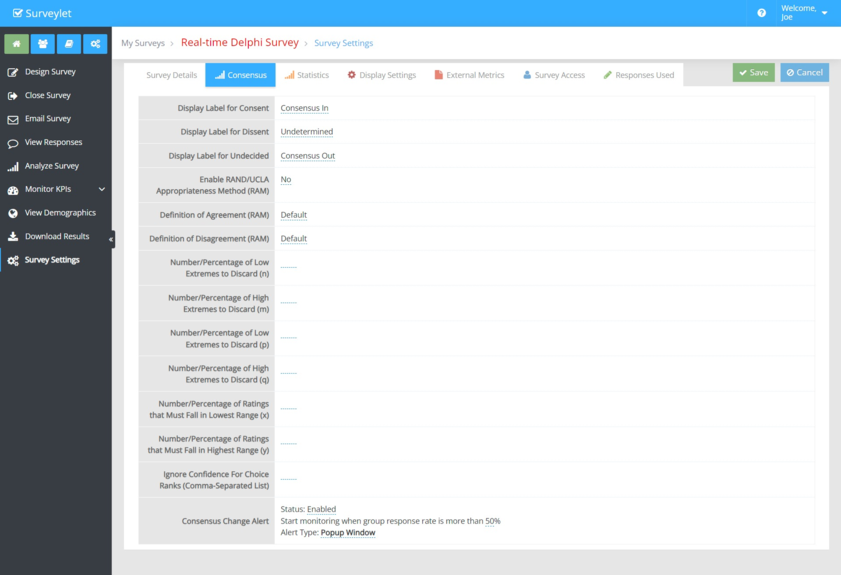
Consensus Change Alert: will display a popup window in Real-time Delphi surveys to notify panelists when somewhere in the survey on a page other than the current page the panelists is on a consensus for a question has changed (consensus reached or lost), or its stability level has shifted since the last time panelists answered it. This could be a useful feature normally in small surveys that can notify people when they return to their questionnaire that something somewhere has changed. Evaluate the situation that you can use it for as keeping it on could be annoying to panelists in long running surveys as popups will be opening and closing nonstop as others are filling out the survey.
Display Label for Consent: displays text for consent status in all pages and reports. Default is "Consent". You may use any other labels such as "Consensus In", "Agreement", "Consensus", and so on.
Display Label for Dissent: displays text for dissent status in all pages and reports. Default is "Dissent". You may use any other labels such as "Consensus Out", "Disagreement", "Dissensus", and so on.
Display Label for Undecided: displays text for undecided status in all pages and reports. Default is "Undetermined". You may use any other labels such as "Unclear", "Unknown", "Undecided", and so on.
Enable RAND/UCLA Appropriateness Method (RAM): default: No. When enabled, the consensus is calculated using the RAND/UCLA Appropriateness Method (read more or download PDF). All settings under the Consensus tab (except for Consensus Change Alert) are ignored if the RAND/UCLA Appropriateness Method is not enabled. From the Statistics tab, the following statistics can be tracked when the RAM Method is enabled:
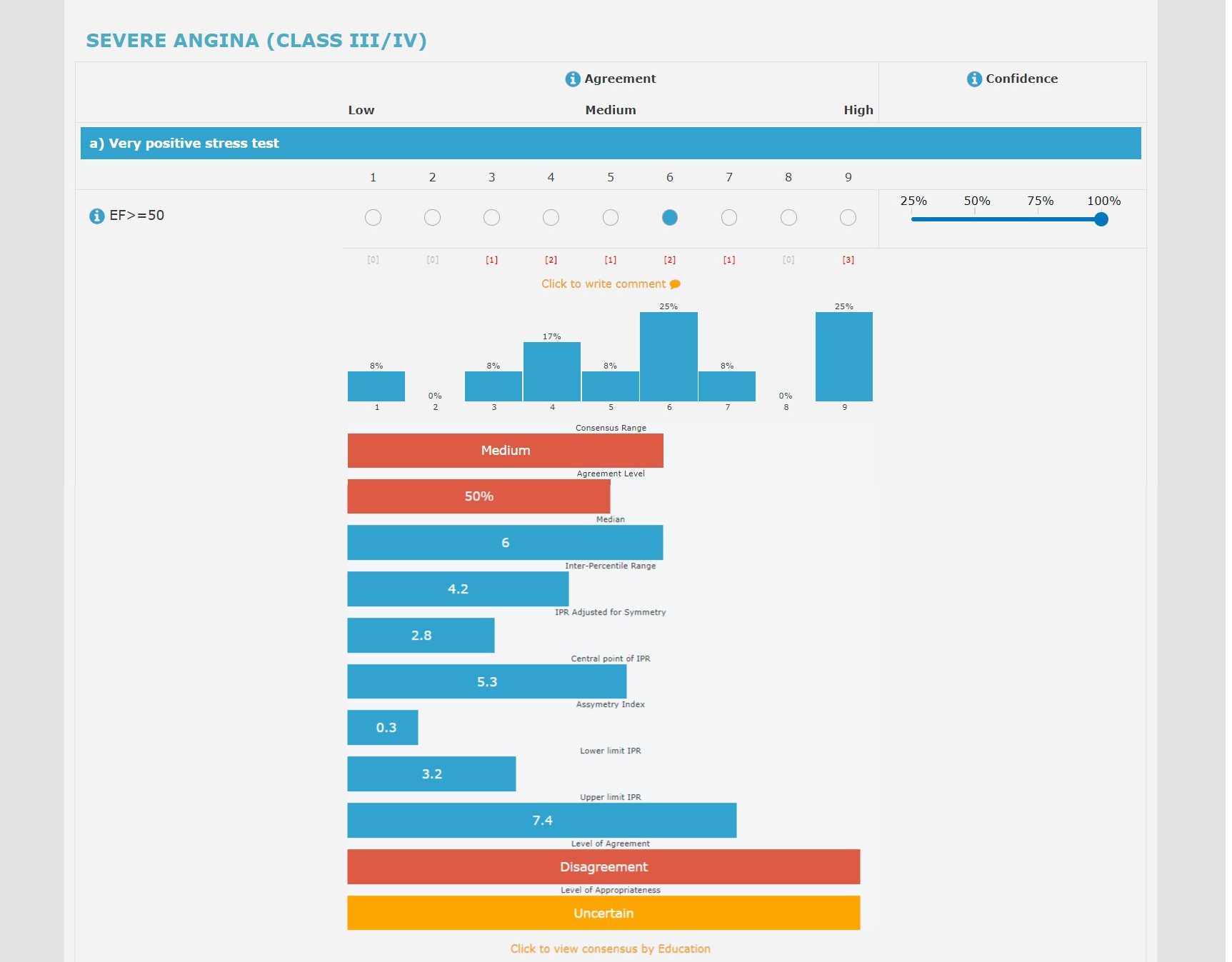
IPR: Inter-Percentile Range
IPRAS: IPR Adjusted for Symmetry
IPRCP: Central point of IPR
AI: Assymetry Index
Lp: Lower limit IPR
Up: Upper limit IPR
AGREEMENT: Level of Agreement
APPROPRIATENESS: Level of Appropriateness
NOTE: use only 9-point Likert scale questions for RAM calculation.
Definition of Agreement (RAM): set the criteria for agreement when the RAM method is enabled.
Definition of Disagreement (RAM): set the criteria for disagreement when the RAM method is enabled.
Number/Percentage of Low Extremes to Discard (n): set the parameter for Agreement criteria if the agreement criteria you selected above requires it. It accepts a numerical value or a percent. Use the percentage sign if the value is in percentage (e.g. 8%).
Number/Percentage of High Extremes to Discard (m): set the parameter for Agreement criteria if the agreement criteria you selected above requires it. It accepts a numerical value or a percent. Use the percentage sign if the value is in percentage (e.g. 8%). If value is not provided, the default is 0.
Number/Percentage of Low Extremes to Discard (p): set the parameter for Disagreement criteria if the disagreement criteria you selected above requires it. It accepts a numerical value or a percent. Use the percentage sign if the value is in percentage (e.g. 8%). If value is not provided, the default is 0.
Number/Percentage of High Extremes to Discard (q): set the parameter for Disagreement criteria if the disagreement criteria you selected above requires it. It accepts a numerical value or a percent. Use the percentage sign if the value is in percentage (e.g. 8%). If value is not provided, the default is 0.
Number/Percentage of Ratings that Must Fall in Lowest Range (x): set the parameter for Disagreement criteria if the disagreement criteria you selected above requires it. It accepts a numerical value or a percent. Use the percentage sign if the value is in percentage (e.g. 8%). If value is not provided, the default is 10%.
Number/Percentage of Ratings that Must Fall in Highest Range (y): set the parameter for Disagreement criteria if the disagreement criteria you selected above requires it. It accepts a numerical value or a percent. Use the percentage sign if the value is in percentage (e.g. 8%). If value is not provided, the default is 10%.
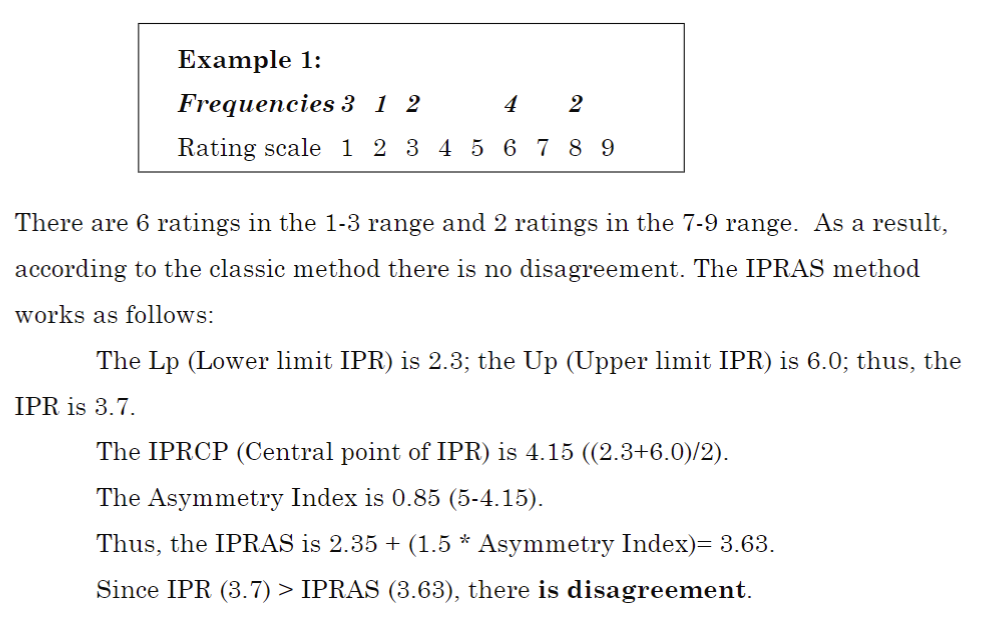
Calculating Disagreement (Example):
Calculating Appropriateness:
Appropriateness is determined using the median of the panelists' ratings and the degree of disagreement among the panelists. Its values can be (on a 9-point Likert scale ):
- Appropriate: when the median is greater than or equal to 7, without disagreement.
- Inappropriate: when the median is less than or equal to 3, without disagreement.
- Uncertain: when the median is greater than 3 and less than 7, or in case of disagreement.
- Necessary: when it is appropriate and the median of the necessity is greater than or equal to 7, without disagreement.
Visualization of Appropriateness and its associated statistics in the survey questionnaire: