
Build the questionnaire · Administrator
Let participants suggest new choices or rows
Use adaptive input when the study design allows panelists to add items that become visible to the panel.
Screenshots illustrate the controls below. Layouts and labels may vary with your survey configuration. Select an image or “View full size” to open it in a new tab.
How adaptive input works
An adaptive question accepts a participant’s suggestion through an “Other, please specify” input. After saving, supported question types add the new text as a choice; a supported adaptive matrix adds it as a new row. Other participants can then see and answer the added item.
This changes the available questionnaire content during data collection. Decide in advance whether that behavior fits your study. If suggestions should be reviewed privately first, collect them as text instead of immediately exposing adaptive additions.
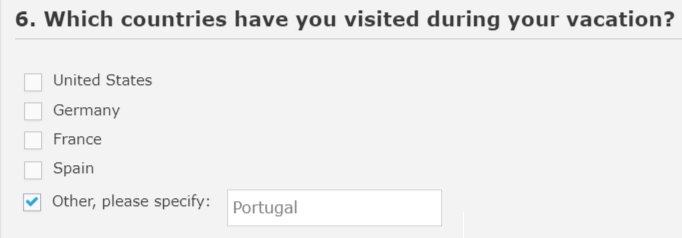
More screenshots and examples (1)
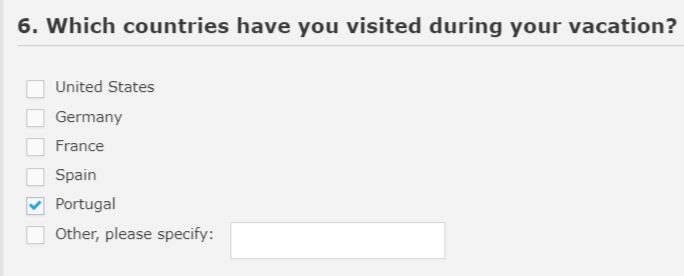
Configure the question
- Enable Adaptive Question on the supported question or matrix.
- For radio-button or checkbox questions, mark the relevant choice as a text-entry choice.
- Write clear instructions for suggesting an item and saving it.
- If a target question should receive additions from another question, configure its Adaptive Source Question.
- Test one new suggestion, a repeated suggestion, and any linked target question.
The documented behavior appends new choices rather than sorting them alphabetically. If the suggestion matches an existing choice, a new duplicate is not created.
Tell participants what may change
Adaptive additions may affect the progress denominator, particularly when new matrix rows are added. A participant’s percentage can decrease even though their existing answers remain saved. Explain this possibility before the study starts.
Export and document the final item list, including which choices were originally programmed and which were participant-generated.
Detailed instructions: Adaptive Questions
-
You may only display one text choice for a question, but panelists can repeat the process and save multiple new options one at a time. You may want to add some notes regarding this in the footer text of the question.
-
If a custom choice already existed among the choices, then no new choice will be created, and the already existing choice will be marked as the participants' answer.
-
Newly added adaptive choices are not ordered alphabetically; the new text choice will be appended as the last choice for the question.
-
Adaptive choices can also be exported as a new choice to one or more questions on one or more pages. See Adaptive Source Question settings below.
-
The Adaptive flag can be enabled for Radio button, Checkbox and Numeric Ranking question types. For Radio button and Checkbox questions, you need to also designate one of the choices as a Text Choice (from Choice Settings window); for the Numeric Question type, only the Adaptive question setting flag needs to be set and a new empty record is appended as last choice for the question and displayed to panelists during runtime.