
Participants & access · Administrator
Choose the survey privacy level
Understand Low, Medium, and High privacy and make the choice before the first response is collected.
Screenshots illustrate the controls below. Layouts and labels may vary with your survey configuration. Select an image or “View full size” to open it in a new tab.
Compare the three levels
| Level | Administrators | Participants |
|---|---|---|
| Low | Can identify participants and their answers. | Can identify other participants where identifying information is displayed. |
| Medium | Can identify participants and their answers. | Cannot identify other participants through the survey’s identity displays. |
| High | Participant identities are hidden in the survey’s reporting views. | Participant identities are hidden. |
Medium is the documented default. Choose the level your protocol requires rather than relying on the default. High privacy hides identities in Surveylet; it does not remove names that participants themselves type into free-text answers or that your team stores separately.
Set it before launch
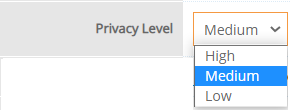
Open Survey Settings → Survey Details → Privacy Level. Review the selected level before any test or live answers are recorded.
Once the survey has responses, the privacy level is locked. Changing it requires clearing responses. Do not delete study data simply to change the setting; contact Calibrum to discuss the appropriate approach.
Reduce unnecessary identifying data
Email addresses are not required for every access method. Unique random identifiers can be used with individual links. If your team keeps a key linking identifiers to people, protect it separately. Review IP/location tracking and whether subgroup labels or comments could reveal a participant in a small panel.
For organizational policies, see Privacy and Security. These policies complement the survey settings and your own study information sheet.
Common questions
Is anonymous access the same as High privacy?
No. Anonymous access describes how people enter without supplying their identity. High privacy describes what identifying information the survey displays. Decide and test both separately.